Below you can find a description of the main LayerZero V2 contracts and find the corresponding deployment information for each blockchain network LayerZero supports.
Endpoint Id (eid) values have no relation to Chain Id (chainId) values. Since LayerZero spans both EVM and non-EVM chains, each Endpoint contract has a unique identifier known as the eid for determining which chain’s endpoint to send to or receive messages from.When using LayerZero contract methods, be sure to use the correct eid listed below:
  • 30xxx: refer to mainnet chains
  • 40xxx: refer to testnet chains
To see if a specific LayerZero contract supports another, use the isSupportedEid() method.

Contract Description

Contract NameDescription
EndpointV2The primary entrypoint into LayerZero V2 responsible for managing crosschain communications. It orchestrates message sending, receiving, and configuration management between various smart contract connections using message library contracts and internal mappings to track OApp specific settings.
SendUln302A message library for sending crosschain messages. It combines functionalities from SendUlnBase and SendLibBaseE2 to ensure secure message dispatch.
ReceiveUln302A message library for receiving and verifying crosschain messages. It integrates ReceiveUlnBase and ReceiveLibBaseE2 to maintain message integrity.
SendUln301A version of the send message library compatible with EndpointV1 for backwards compatibility with EndpointV2.
ReceiveUln301A version of the receive message library compatible with EndpointV1 for backwards compatibility with EndpointV2.
LZ ExecutorA contract responsible for executing received crosschain messages automatically with a specified gas limit and msg.value for a fee.
LZ Dead DVNRepresents a Dead Decentralized Verifier Network (DVN). These contracts are placeholders used when the default LayerZero config is inactive and will require the OApp owner to manually configure the contract’s config to use the pathway.
Blocked Message LibraryA message library that blocks messages from being sent or received. Used to disable specific pathways at the protocol level.

Checking Default Configs

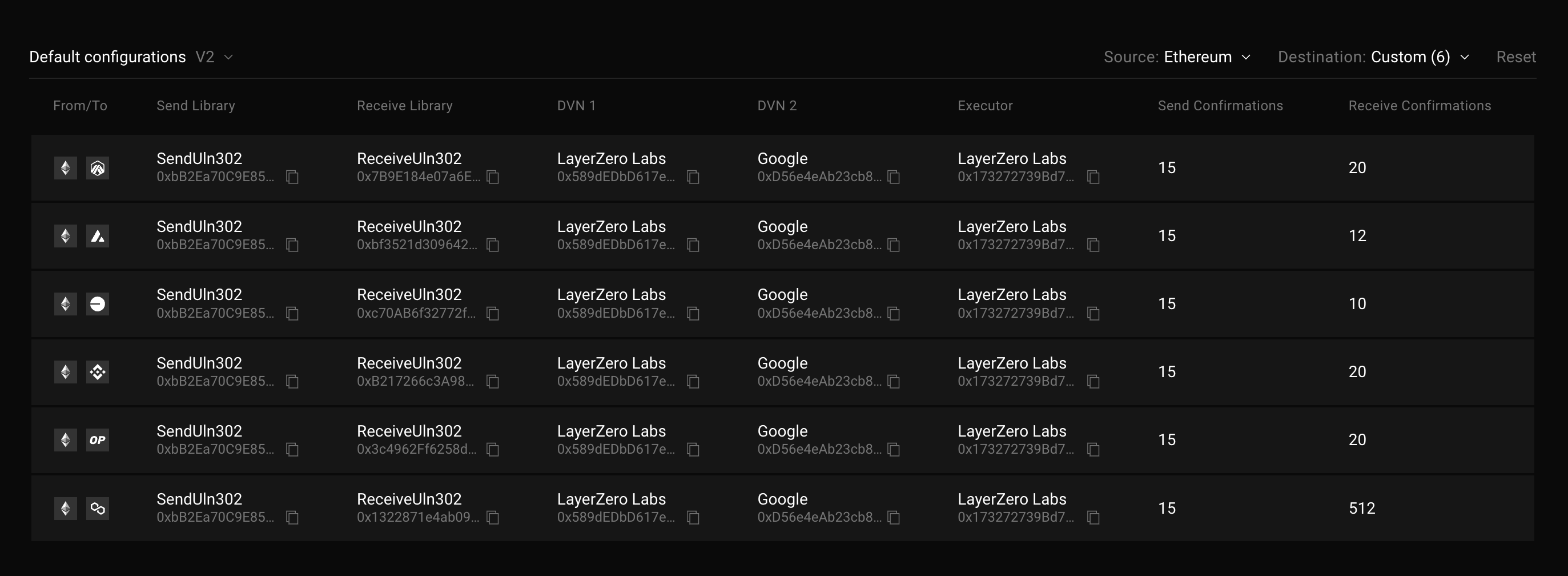
To see the default configuration for a given pathway (i.e., from Chain A to Chain B), you can use LayerZero Scan’s Default Checker. LayerZero Scan Default Configurations interface showing a table of pathway configurations from Ethereum to various destinations, displaying columns for Send Library (SendUln302), Receive Library (ReceiveUln302), DVN providers (LayerZero Labs, Google), Executor, and confirmation requirements