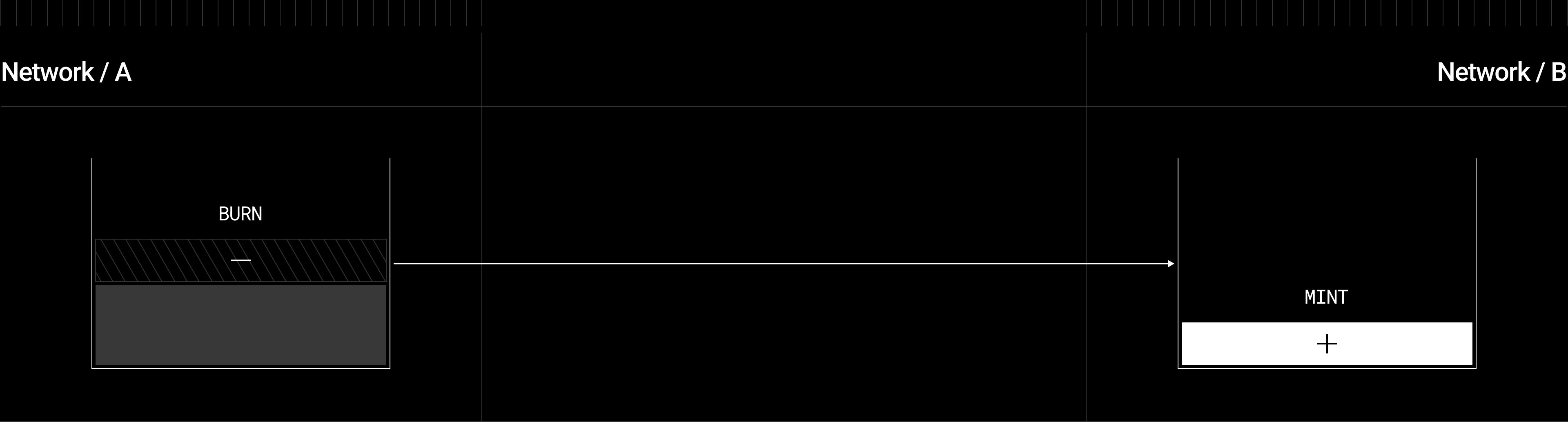
The Omnichain Fungible Token (OFT) Standard enables fungible tokens to exist across multiple blockchains while maintaining a unified supply. The OFT standard works by debiting an amount of tokens from a sender on the source chain and crediting the same amount of tokens to a receiver on the destination chain.

OFT

The _debit function in OFT.sol burns an amount of an ERC20 token, while _credit mints ERC20 tokens on the destination chain. Diagram showing OFT burn-and-mint mechanism: tokens are burned (subtracted) on Network A and minted (added) on Network B, connected by an arrow representing the crosschain transfer OFT.sol extends the base OApp.sol and inherits ERC20, providing both crosschain messaging and standard token functionality: Class inheritance diagram showing OFT.sol extending OApp.sol for crosschain messaging and inheriting ERC20 for standard token functionality
OFT Adapter

OFTAdapter.sol can be used for already deployed ERC20 tokens who lack mint capabilities, so that the _debit function calls safeERC20.transferFrom from a sender, while _credit calls safeERC20.transfer to a receiver. Diagram showing OFT Adapter lock-and-mint mechanism: ERC20 tokens are locked in an escrow contract on Network A, and equivalent OFT tokens are minted on Network B OFTAdapter.sol provides token bridging without modifying the original ERC20 token contract: Class inheritance diagram showing OFTAdapter.sol extending OApp.sol for crosschain messaging while wrapping an existing ERC20 token contract
If your use case involves crosschain messaging beyond token transfers, consider using the OApp Standard for maximum flexibility.
For detailed technical information about transfer flows, decimal handling, and architecture patterns, see the OFT Technical Reference.

Explore Deployed OFTs

Browse production OFT deployments from various asset issuers, including Stargate-managed assets, on the OFT Ecosystem & Stargate Assets page. See which tokens are available for crosschain transfers across LayerZero-supported chains.

Find your chain

LayerZero supports OFT deployment on every EVM chain in the table below. Find your chain’s Endpoint ID (EID), EndpointId enum token, native chain ID, and a default RPC URL, then use those values wherever this guide references a chain (for example in your hardhat.config.ts networks block and your LayerZero config). The deployment flow is identical for every chain; only these identifiers change.
ChainStageEIDEndpointIdNative chain IDRPC URL
0G Mainnetmainnet30388OG_V2_MAINNET16661https://evmrpc.0g.ai
Abstract Mainnetmainnet30324ABSTRACT_V2_MAINNET2741https://api.mainnet.abs.xyz
Animechain Mainnetmainnet30372ANIMECHAIN_V2_MAINNET69000(add your RPC)
Ape Mainnetmainnet30312APE_V2_MAINNET33139https://rpc.apechain.com
Apex Fusion Nexus Mainnetmainnet30384APEXFUSIONNEXUS_V2_MAINNET9069https://rpc.nexus.mainnet.apexfusion.org
Arbitrum Mainnetmainnet30110ARBITRUM_V2_MAINNET42161https://arb1.arbitrum.io/rpc
Arbitrum Nova Mainnetmainnet30175NOVA_V2_MAINNET42170https://arbitrum-nova.gateway.tenderly.co
Arc Mainnetmainnet30417ARC_V2_MAINNET5042(add your RPC)
Astar Mainnetmainnet30210ASTAR_V2_MAINNET592https://astar.api.onfinality.io/public
Astar zkEVM Mainnetmainnet30257ZKATANA_V2_MAINNET3776https://rpc.startale.com/astar-zkevm
AULT Mainnetmainnet30413AULT_V2_MAINNET904(add your RPC)
Avalanche Mainnetmainnet30106AVALANCHE_V2_MAINNET43114https://api.avax.network/ext/bc/C/rpc
Base Mainnetmainnet30184BASE_V2_MAINNET8453https://mainnet.base.org
Beam Mainnetmainnet30198MERITCIRCLE_V2_MAINNET4337https://subnets.avax.network/beam/mainnet/rpc
Berachain Mainnetmainnet30362BERA_V2_MAINNET80094https://rpc.berachain.com
Bitlayer Mainnetmainnet30314BITLAYER_V2_MAINNET200901https://rpc.bitlayer.org
Blast Mainnetmainnet30243BLAST_V2_MAINNET81457https://rpc.blast.io
BNB Smart Chain (BSC) Mainnetmainnet30102BSC_V2_MAINNET56https://bsc.drpc.org
BOB Mainnetmainnet30279BOB_V2_MAINNET60808https://rpc.gobob.xyz
Botanixmainnet30376BOTANIX_V2_MAINNET3637https://rpc.botanixlabs.com
Bouncebit Mainnetmainnet30293BOUNCEBIT_V2_MAINNET6001https://fullnode-mainnet.bouncebitapi.com
Camp Mainnetmainnet30381CAMP_V2_MAINNET484https://rpc.camp.raas.gelato.cloud
Canto Mainnetmainnet30159CANTO_V2_MAINNET7700https://canto-rpc.ansybl.io
Celo Mainnetmainnet30125CELO_V2_MAINNET42220https://forno.celo.org
Chiliz Mainnetmainnet30409CHILIZ_V2_MAINNET88888https://chiliz-mainnet.gateway.tatum.io
Citrea Mainnetmainnet30403CITREA_V2_MAINNET4114https://rpc.mainnet.citrea.xyz
Codex Mainnetmainnet30323CODEX_V2_MAINNET81224https://rpc.codex.xyz
Concretemainnet30366CONCRETE_V2_MAINNET12739(add your RPC)
Conflux eSpace Mainnetmainnet30212CONFLUX_V2_MAINNET1030https://evm.confluxrpc.com
Core Mainnetmainnet30153COREDAO_V2_MAINNET1116https://rpc.coredao.org
Cronos EVM Mainnetmainnet30359CRONOSEVM_V2_MAINNET25https://evm.cronos.org
Cronos zkEVM Mainnetmainnet30360CRONOSZKEVM_V2_MAINNET388https://mainnet.zkevm.cronos.org
Cyber Mainnetmainnet30283CYBER_V2_MAINNET7560https://rpc.cyber.co
Degen Mainnetmainnet30267DEGEN_V2_MAINNET666666666https://rpc.degen.tips
Derive Mainnetmainnet30311LYRA_V2_MAINNET957https://rpc.lyra.finance
Dexalot Subnet Mainnetmainnet30118DEXALOT_V2_MAINNET432204https://subnets.avax.network/dexalot/mainnet/rpc
DFK Chainmainnet30115DFK_V2_MAINNET53935https://subnets.avax.network/defi-kingdoms/dfk-chain/rpc
Dinari Mainnetmainnet30385DINARI_V2_MAINNET202110https://subnets.avax.network/dinari/mainnet/rpc
DM2 Verse Mainnetmainnet30315DM2VERSE_V2_MAINNET68770https://rpc.dm2verse.dmm.com
Doma Mainnetmainnet30393DOMA_V2_MAINNET97477https://doma.drpc.org
DOS Chain Mainnetmainnet30149DOS_V2_MAINNET7979https://main.doschain.com
EDU Chain Mainnetmainnet30328EDU_V2_MAINNET41923https://rpc.edu-chain.raas.gelato.cloud
Ethereal Mainnetmainnet30391ETHEREAL_V2_MAINNET1380270412(add your RPC)
Ethereum Mainnetmainnet30101ETHEREUM_V2_MAINNET1(add your RPC)
Etherlink Mainnetmainnet30292ETHERLINK_V2_MAINNET42793https://node.mainnet.etherlink.com
EVM on Flow Mainnetmainnet30336FLOW_V2_MAINNET747https://mainnet.evm.nodes.onflow.org
Fantom Mainnetmainnet30112FANTOM_V2_MAINNET250https://rpcapi.fantom.network
Flare Mainnetmainnet30295FLARE_V2_MAINNET14https://flare-api.flare.network/ext/C/rpc
Fraxtal Mainnetmainnet30255FRAXTAL_V2_MAINNET252https://rpc.frax.com
Fuse Mainnetmainnet30138FUSE_V2_MAINNET122https://fuse-pokt.nodies.app
Gate Layer Mainnetmainnet30389GATELAYER_V2_MAINNET10088https://gatelayer-mainnet.gatenode.cc
Gensyn Mainnetmainnet30412GENSYN_V2_MAINNET685689(add your RPC)
Gnosis Mainnetmainnet30145GNOSIS_V2_MAINNET100https://rpc.gnosischain.com
Goat Mainnetmainnet30361GOAT_V2_MAINNET2345https://rpc.goat.network
Gravity Mainnetmainnet30294GRAVITY_V2_MAINNET1625https://rpc.gravity.xyz
Gunz Mainnetmainnet30371GUNZ_V2_MAINNET43419https://rpc.gunzchain.io/ext/bc/2M47TxWHGnhNtq6pM5zPXdATBtuqubxn5EPFgFmEawCQr9WFML/rpc
Harmony Mainnetmainnet30116HARMONY_V2_MAINNET1666600000https://api.s0.t.hmny.io
Hedera Mainnetmainnet30316HEDERA_V2_MAINNET295https://mainnet.hashio.io/api
Hemi Mainnetmainnet30329HEMI_V2_MAINNET43111https://rpc.hemi.network/rpc
Horizen Mainnetmainnet30399HORIZEN_V2_MAINNET26514https://horizen.calderachain.xyz/http
Hubble Mainnetmainnet30182HUBBLE_V2_MAINNET1992https://sanko-arb-sepolia.rpc.caldera.xyz/http
Humanity Mainnetmainnet30382HUMANITY_V2_MAINNET6985385https://humanity-mainnet.g.alchemy.com/public
HyperEVM Mainnetmainnet30367HYPERLIQUID_V2_MAINNET999https://hyperliquid.rpc.blxrbdn.com
Injective EVM Mainnetmainnet30394INJECTIVEEVM_V2_MAINNET1776https://injectiveevm-rpc.polkachu.com
Ink Mainnetmainnet30339INK_V2_MAINNET57073https://rpc-gel.inkonchain.com
IOTA EVM Mainnetmainnet30284IOTA_V2_MAINNET8822https://rpc.ankr.com/iota_evm
Irys Mainnetmainnet30408IRYS_V2_MAINNET3282https://mainnet-beta-rpc-2.irys.xyz/v1/execution-rpc
Japan Open Chain Mainnetmainnet30285JOC_V2_MAINNET81https://rpc-1.japanopenchain.org:8545
Kaia Mainnet (formerly Klaytn)mainnet30150KLAYTN_V2_MAINNET8217https://public-en.node.kaia.io
Katanamainnet30375KATANA_V2_MAINNET747474https://rpc.katana.network
Kava Mainnetmainnet30177KAVA_V2_MAINNET2222https://evm.kava.io
Kite Mainnetmainnet30406KITE_V2_MAINNET2366https://rpc.gokite.ai
Lens Mainnetmainnet30373LENS_V2_MAINNET232https://rpc.lens.xyz
Lightlink Mainnetmainnet30309LIGHTLINK_V2_MAINNET1890https://replicator.phoenix.lightlink.io/rpc/v1
Linea Mainnetmainnet30183ZKCONSENSYS_V2_MAINNET59144https://rpc.linea.build
Lisk Mainnetmainnet30321LISK_V2_MAINNET1135https://rpc.api.lisk.com
Manta Pacific Mainnetmainnet30217MANTA_V2_MAINNET169https://pacific-rpc.manta.network/http
Mantle Mainnetmainnet30181MANTLE_V2_MAINNET5000https://rpc.mantle.xyz
MegaETH Mainnetmainnet30398MEGAETH_V2_MAINNET4326(add your RPC)
Merlin Mainnetmainnet30266MERLIN_V2_MAINNET4200https://merlin.drpc.org
Meter Mainnetmainnet30176METER_V2_MAINNET82https://rpc.meter.io
Metis Mainnetmainnet30151METIS_V2_MAINNET1088https://andromeda.metis.io/?owner=1088
Mode Mainnetmainnet30260MODE_V2_MAINNET34443https://mainnet.mode.network
Monad Mainnetmainnet30390MONAD_V2_MAINNET143https://rpc1.monad.xyz
Moonbeam Mainnetmainnet30126MOONBEAM_V2_MAINNET1284https://rpc.api.moonbeam.network
Moonriver Mainnetmainnet30167MOONRIVER_V2_MAINNET1285https://rpc.api.moonriver.moonbeam.network
Morph Mainnetmainnet30322MORPH_V2_MAINNET2818https://rpc.morphl2.io
Near Aurora Mainnetmainnet30211AURORA_V2_MAINNET1313161554https://mainnet.aurora.dev
Neo X Mainnetmainnet30414NEOX_V2_MAINNET47763(add your RPC)
Nexera Mainnetmainnet30395NEXERA_V2_MAINNET7208https://rpc.nexera.network
Nibiru Mainnetmainnet30369NIBIRU_V2_MAINNET6900https://evm-rpc.nibiru.fi
opBNB Mainnetmainnet30202OPBNB_V2_MAINNET204https://opbnb-mainnet-rpc.bnbchain.org
OpenLedger Mainnetmainnet30392OPENLEDGER_V2_MAINNET1612https://rpc.openledger.xyz
Optimism Mainnetmainnet30111OPTIMISM_V2_MAINNET10https://mainnet.optimism.io
Orderly Mainnetmainnet30213ORDERLY_V2_MAINNET291https://rpc.orderly.network
Otherworld Space Mainnetmainnet30341SPACE_V2_MAINNET8227https://subnets.avax.network/space/mainnet/rpc
Peaq Mainnetmainnet30302PEAQ_V2_MAINNET3338https://quicknode3.peaq.xyz
Pharos Mainnetmainnet30407PHAROS_V2_MAINNET1672(add your RPC)
Plasma Mainnetmainnet30383PLASMA_V2_MAINNET9745https://rpc.plasma.to
Plume Mainnetmainnet30370PLUMEPHOENIX_V2_MAINNET98866https://rpc.plume.org
Polygon Mainnetmainnet30109POLYGON_V2_MAINNET137https://polygon.drpc.org
Rari Chain Mainnetmainnet30235RARIBLE_V2_MAINNET1380012617https://mainnet.rpc.rarichain.org/http
Rayls Mainnetmainnet30415RAYLS_V2_MAINNET72957(add your RPC)
re.al Mainnetmainnet30237REAL_V2_MAINNET111188https://rpc.realforreal.gelato.digital
Redbelly Mainnetmainnet30402REDBELLY_V2_MAINNET151https://governors.mainnet.redbelly.network
Reya Mainnetmainnet30313REYA_V2_MAINNET1729https://rpc.reya.network
Rise Mainnetmainnet30401RISE_V2_MAINNET4153(add your RPC)
Robinhood Chain Mainnetmainnet30416ROBINHOOD_V2_MAINNET4663(add your RPC)
Rootstock Mainnetmainnet30333ROOTSTOCK_V2_MAINNET30https://mycrypto.rsk.co
Scroll Mainnetmainnet30214SCROLL_V2_MAINNET534352https://rpc.scroll.io
Sei Mainnetmainnet30280SEI_V2_MAINNET1329https://evm-rpc.sei-apis.com
Shimmer Mainnetmainnet30230SHIMMER_V2_MAINNET148https://json-rpc.evm.shimmer.network
Silicon Mainnetmainnet30379SILICON_V2_MAINNET2355https://silicon-mainnet.nodeinfra.com
Skale Mainnetmainnet30273SKALE_V2_MAINNET2046399126https://mainnet.skalenodes.com/v1/elated-tan-skat
Somnia Mainnetmainnet30380SOMNIA_V2_MAINNET5031(add your RPC)
Soneium Mainnetmainnet30340SONEIUM_V2_MAINNET1868https://rpc.soneium.org
Sonic Mainnetmainnet30332SONIC_V2_MAINNET146https://rpc.soniclabs.com
Sophon Mainnetmainnet30334SOPHON_V2_MAINNET50104https://rpc.sophon.xyz
Stable Mainnetmainnet30396STABLE_V2_MAINNET988(add your RPC)
Story Mainnetmainnet30364STORY_V2_MAINNET1514https://rpc.ankr.com/story_mainnet
Subtensor EVM Mainnetmainnet30374SUBTENSOREVM_V2_MAINNET964https://bittensor-lite-public.nodies.app
Superposition Mainnetmainnet30327SUPERPOSITION_V2_MAINNET55244https://rpc.superposition.so
Tacmainnet30377TAC_V2_MAINNET239https://rpc.ankr.com/tac
Taiko Mainnetmainnet30290TAIKO_V2_MAINNET167000https://rpc.taiko.xyz
TelosEVM Mainnetmainnet30199TELOS_V2_MAINNET40https://rpc.telos.net
Tempo Mainnetmainnet30410TEMPO_V2_MAINNET4217(add your RPC)
Tenet Mainnetmainnet30173TENET_V2_MAINNET1559https://rpc.ankr.com/tenet_evm
Tiltyard Mainnetmainnet30238TILTYARD_V2_MAINNET710420https://subnets.avax.network/tiltyard/mainnet/rpc
Unichain Mainnetmainnet30320UNICHAIN_V2_MAINNET130https://unichain.api.onfinality.io/public
Vana Mainnetmainnet30330ISLANDER_V2_MAINNET1480https://rpc.vana.org
Viction Mainnetmainnet30196TOMO_V2_MAINNET88https://viction.blockpi.network/v1/rpc/public
Worldchain Mainnetmainnet30319WORLDCHAIN_V2_MAINNET480https://worldchain.drpc.org
X Layer Mainnetmainnet30274XLAYER_V2_MAINNET196https://xlayerrpc.okx.com
Xai Mainnetmainnet30236XAI_V2_MAINNET660279https://xai-chain.net/rpc
XDC Mainnetmainnet30365XDC_V2_MAINNET50https://rpc.ankr.com/xdc
XPLA Mainnetmainnet30216XPLA_V2_MAINNET37https://dimension-evm-rpc.xpla.dev
Zama Mainnetmainnet30397ZAMA_V2_MAINNET261131(add your RPC)
Zircuit Mainnetmainnet30303ZIRCUIT_V2_MAINNET48900https://mainnet.zircuit.com
zkSync Era Mainnetmainnet30165ZKSYNC_V2_MAINNET324https://mainnet.era.zksync.io
zkVerify Mainnetmainnet30386ZKVERIFY_V2_MAINNET1408https://vflow-rpc.zkverify.io
Zora Mainnetmainnet30195ZORA_V2_MAINNET7777777https://rpc.zora.energy
Arbitrum Sepolia Testnettestnet40231ARBSEP_V2_TESTNET421614https://sepolia-rollup.arbitrum.io/rpc
Avalanche Fuji Testnettestnet40106AVALANCHE_V2_TESTNET43113https://api.avax-test.network/ext/bc/C/rpc
Base Sepolia Testnettestnet40245BASESEP_V2_TESTNET84532https://base-sepolia-rpc.publicnode.com
Berachain Bepolia Testnettestnet40371BEPOLIA_V2_TESTNET80069https://bepolia.rpc.berachain.com
BNB Smart Chain (BSC) Testnettestnet40102BSC_V2_TESTNET97https://data-seed-prebsc-2-s1.bnbchain.org:8545
Ethereum Holesky Testnettestnet40217HOLESKY_V2_TESTNET17000https://holesky.drpc.org
Ethereum Sepolia Testnettestnet40161SEPOLIA_V2_TESTNET11155111https://ethereum-sepolia-rpc.publicnode.com
EVM on Flow Testnettestnet40351FLOW_V2_TESTNET545https://testnet.evm.nodes.onflow.org
Flare Testnettestnet40294FLARE_V2_TESTNET114https://coston2.enosys.global/ext/C/rpc
Hedera Testnettestnet40285HEDERA_V2_TESTNET296https://296.rpc.thirdweb.com
Hoodi Testnettestnet40449HOODI_V2_TESTNET560048https://0xrpc.io/hoodi
HyperEVM Testnettestnet40362HYPERLIQUID_V2_TESTNET998https://rpc.hyperliquid-testnet.xyz/evm
Optimism Sepolia Testnettestnet40232OPTSEP_V2_TESTNET11155420https://optimism-sepolia-public.nodies.app
Polygon Amoy Testnettestnet40267AMOY_V2_TESTNET80002https://rpc-amoy.polygon.technology
Tempo Testnettestnet40439TEMPODEV1_V2_TESTNET42429https://tempo-testnet.drpc.org
Unichain Testnettestnet40333UNICHAIN_V2_TESTNET1301https://sepolia.unichain.org
zkSync Sepolia Testnettestnet40305ZKSYNCSEP_V2_TESTNET300https://sepolia.era.zksync.dev

Installation

Below, you can find instructions for installing the OFT contract:

OFT in a new project

To start using LayerZero OFT contracts in a new project, use the LayerZero CLI tool, create-lz-oapp. The CLI tool allows developers to create any omnichain application in <4 minutes! Get started by running the following from your command line:
This will create an example repository containing both the Hardhat and Foundry frameworks, LayerZero development utilities, as well as the OFT contract package pre-installed.

OFT in an existing project

To use LayerZero contracts in an existing project, you can install the OFT package directly:
LayerZero contracts work with both OpenZeppelin V5 and V4 contracts. Specify your desired version in your project’s package.json:

Custom OFT Contract

To build your own omnichain token contract, inherit from OFT.sol or OFTAdapter.sol depending on whether you’re creating a new token or bridging an existing one. Below is a complete example showing the key pieces you need to implement:
Remember to add the ERC20 _mint method either in the constructor or as a protected mint function before deploying.
This contract provides a complete omnichain ERC20 implementation. The OFT automatically handles:
  • Burning tokens on the source chain when sending
  • Minting tokens on the destination chain when receiving
  • Decimal precision conversion between different chains
  • Unified supply management across all networks

Constructor

  • Pass the Endpoint V2 address and owner address into the base contracts.
    • OFT(_name, _symbol, _lzEndpoint, _owner) binds your contract to the local LayerZero Endpoint V2 and registers the delegate
    • Ownable(_owner) makes _owner the only address that can change configurations (such as peers, enforced options, and delegate)
  • After deployment, the owner can call:
    • setConfig(...) to adjust library or DVN parameters
    • setSendLibrary(...) and setReceiveLibrary(...) to override default libraries
    • setPeer(...) to whitelist remote OFT addresses
    • setDelegate(...) to assign a different delegate address
    • setEnforcedOptions(...) to set mandatory execution options

Deployment and Wiring

After you finish writing and testing your MyOFT contract, follow these steps to deploy it on each network and wire up the messaging stack.
We strongly recommend using the LayerZero CLI tool to manage your configurations. Our config generator simplifies access to all available deployments across networks and is the preferred method for crosschain messaging. See the CLI Guide for examples and how to use it in your project.

1. Deploy Your OFT Contract

Deploy MyOFT on each chain using either the LayerZero CLI (recommended) or manual deployment scripts.
After running pnpm compile at the root level of your example repo, you can deploy your contracts.

Network Configuration

Before using the CLI, you’ll need to configure your networks in hardhat.config.ts with LayerZero Endpoint IDs (EIDs) and declare an RPC URL in your .env or directly in the config file:
The key addition to a standard hardhat.config.ts is the inclusion of LayerZero Endpoint IDs (eid) for each network. Check the Deployments section for all available endpoint IDs.
The LayerZero CLI provides automated deployment with built-in endpoint detection based on your hardhat.config.ts networks object:
The CLI will prompt you to:
  1. Select chains to deploy to:
  1. Choose deploy script tags:
  1. Confirm deployment:
The CLI automatically:
  • Detects the correct LayerZero Endpoint V2 address for each chain
  • Deploys your OApp contract with proper constructor arguments
  • Generates deployment artifacts in ./deployments/ folder
  • Creates network-specific deployment files (e.g., deployments/sepolia/MyOApp.json)

2. Wire Messaging Libraries and Configurations

Once your contracts are onchain, you must set up send/receive libraries and DVN/Executor settings so crosschain messages flow correctly.
Production deployments should use multiple required DVNs from independent operators. A single-DVN configuration means a compromise of that one verifier results in unrestricted forged messages on the pathway. See the Integration Checklist for production DVN guidance.
The LayerZero CLI automatically handles all wiring via a single configuration file and command:

Configuration File

In your project root, you can find a layerzero.config.ts file:
Make sure your contract object’s contractName matches the named deployment file for the network under ./deployments/.

Wire Everything

Run a single command to configure all pathways:
This automatically handles:
  • Fetching the necessary contract addresses for each network from metadata
  • Setting send and receive libraries
  • Configuring DVNs and Executors
  • Setting up peers between contracts
  • Applying enforced options
  • All bidirectional pathways in your config

Usage

Once deployed and wired, you can begin sending tokens across chains.

Send tokens

The OFT standard provides methods for quoting and sending tokens crosschain via the IOFT interface.

quoteSend() - Get Transfer Fees

quoteOFT() - Get Detailed Transfer Quote

send() - Transfer Tokens

How send() Works Under the Hood

When you call send(), it triggers a chain of calls through the LayerZero protocol:
  1. OFT Contract → Debits tokens
  2. LayerZero Endpoint → Routes the message to your configured MessageLib
  3. Message Library (SendUln302) → Requests verification/execution from configured DVNs/Executor
  4. Workers (DVNs + Executor) → Quote their fees for verification and execution services
  5. Fee Aggregation → Returns total nativeFee needed for the transfer
When deploying an OFT, you choose your own trust assumptions for verification and execution:
  • Send/Receive libraries - Set the MessageLibs for your contract
  • DVNs - Select which DVNs verify your crosschain messages (at least one required)
  • Enforced options OR caller options - Provide gas settings (globally or per call), or transactions fail with LZ_ULN_InvalidWorkerOptions
  • Peers - Register destination OFT addresses for crosschain transfers
These requirements must be satisfied before send() will work. They are configured during the “Deployment and Wiring” step above.

Trust Decisions

Using Managed Applications (e.g., Stargate): You trust the application team’s selected DVNs and Executor configurations.Deploying Your Own OFT: You select your trusted DVNs and Executors, giving you full control over your security assumptions.

Quote Freshness

Call quoteSend() as close as possible to send() execution to avoid stale fee quotes. Fees can change due to:
  • Gas price fluctuations on source/destination chains
  • Price feed updates for crosschain gas estimation
  • DVN fee adjustments
In production applications, quote and send in the same transaction or block when possible.
The LayerZero CLI provides a convenient task for sending OFT tokens that automatically handles fee estimation and transaction execution.

Using the Send Task

The CLI includes a built-in lz:oft:send task that:
  1. Finds your deployed OFT contract automatically
  2. Quotes the gas cost using your OFT’s quoteSend() function
  3. Sends the tokens with the correct fee
  4. Provides tracking links for the transaction
Basic usage:
Required Parameters:
  • --src-eid: Source endpoint ID (e.g., 40232 for Optimism Sepolia)
  • --dst-eid: Destination endpoint ID (e.g., 40231 for Arbitrum Sepolia)
  • --amount: Amount to send in human readable units (e.g., “1.5”)
  • --to: Recipient address (20-byte hex for EVM)
Optional Parameters:
  • --min-amount: Minimum amount to receive for slippage protection (e.g., “1.4”)
  • --extra-options: Additional gas units for lzReceive, lzCompose, or receiver address
  • --compose-msg: Arbitrary bytes message to deliver alongside the OFT
  • --oft-address: Override the source OFT address (if not using deployment artifacts)
Example with optional parameters:
The task automatically:
  • Finds your deployed OFT contract from deployment artifacts
  • Handles token approvals (for OFTAdapter)
  • Quotes the exact gas fee needed
  • Provides block explorer and LayerZero Scan links for tracking

Send tokens + call composer

Horizontal composability allows your OFT to trigger additional actions on the destination chain through separate, containerized message packets. Unlike vertical composability (multiple calls in a single transaction), horizontal composability processes operations independently, providing better fault isolation and gas efficiency. Diagram showing horizontal composability flow: OFT processes token transfer in lzReceive, then calls endpoint.sendCompose to queue a separate composed message that the Composer contract receives via lzCompose for custom logic execution

Benefits of Horizontal Composability

  • Fault Isolation: If a composed call fails, it doesn’t revert the main token transfer
  • Gas Efficiency: Each step can have independent gas limits and execution options
  • Flexible Workflows: Complex multi-step operations can be broken into manageable pieces
  • Non-Critical Operations: Secondary actions (like swaps or staking) can fail without affecting token delivery

Workflow Overview

  1. Token Transfer: OFT processes the token transfer in _lzReceive() and credits tokens to the recipient
  2. Compose Message: OFT calls endpoint.sendCompose() to queue a separate composed message
  3. Composer Execution: The composer contract receives the message via lzCompose() and executes custom logic

Sending with ComposeMsg

When sending tokens with composed actions, set the to address to your composer contract and include your custom composeMsg:

Understanding the Message Encoding

When using composed messages, the OFT encodes your composeMsg along with token transfer data. After processing the transfer, the destination OFT re-encodes this data and delivers it to your composer contract via endpoint.sendCompose(). For the complete message structures and codec functions, see the Message Encoding Reference documentation.

Execution Options for Composed Messages

Composed messages require gas for two separate executions:
  1. Token Transfer (lzReceive): Credits tokens and queues the composed message
  2. Composer Call (lzCompose): Executes your custom logic in the composer contract
Two-Phase Gas Requirements:
  • lzReceiveOption: Gas for token crediting + endpoint.sendCompose() call (varies with composeMsg size)
  • lzComposeOption: Gas for your composer contract’s business logic (depends on complexity)
Always test your composed implementation to determine adequate gas limits for both phases. If either phase runs out of gas, you’ll need to manually retry the failed execution.

Using the CLI with Composed Messages

The lz:oft:send task supports composed messages via the --compose-msg and --extra-options parameters:
Encoding Compose Messages: The --compose-msg parameter expects hex-encoded bytes. You can encode data using:
  • Online tools: Use ethers.js playground or similar tools to encode your data
  • Cast command: cast abi-encode "function_signature" param1 param2
  • Hardhat console: ethers.utils.defaultAbiCoder.encode(['address'], ['0x...'])
Extra Options: The --extra-options above includes both lzReceiveOption (gas: 65534) and lzComposeOption (index: 0, gas: 50000) for composed messages.

Implementing a Composer Contract

The composer contract must implement IOAppComposer to handle composed messages. Here’s a comprehensive example:

Key Security Considerations

  • Endpoint Verification: Always verify msg.sender == endpoint
  • OApp Authentication: Only accept messages from trusted OApps
  • Message Validation: Validate all decoded parameters before execution
  • Reentrancy Protection: Consider using ReentrancyGuard for complex operations
Token Availability: The OFT automatically credits tokens to the composer address before calling lzCompose, so your composer can immediately use the received tokens. The tokens are already available in the composer’s balance when lzCompose executes.

Extensions

The OFT Standard can be extended to support several different use cases, similar to the ERC20 token standard. Since OFT inherits from the base OApp contract, all OApp extensions and patterns are also available to OFT implementations, providing maximum flexibility for crosschain token applications. Below you can find relevant patterns and extensions:

Rate Limiting

The RateLimiter pattern controls the number of tokens that can be transferred crosschain within a specific time window. This is particularly valuable for OFTs to prevent abuse and ensure controlled token flow across chains.

Why Use Rate Limiting for OFTs?

  • Prevent Token Drain Attacks: Protects against malicious actors attempting to rapidly drain tokens from a chain
  • Regulatory Compliance: Helps meet compliance requirements for controlled cross-blockchain token transfers
  • Supply Management: Maintains balanced token distribution across chains by limiting transfer velocity
  • Risk Management: Reduces exposure to smart contract vulnerabilities or bridge exploits

Implementation

Inherit from both OFT and RateLimiter in your contract:

Configuration

Set up rate limits per destination chain during deployment:

Dynamic Rate Limit Management

Add functions to update rate limits post-deployment:

Rate Limit Behavior

When a transfer exceeds the rate limit:
  • The transaction reverts with a rate limit error
  • Users must wait for the time window to reset
  • The limit resets based on a sliding window mechanism
Consider implementing different rate limits for different user tiers (e.g., higher limits for verified institutions) by overriding the rate limit check logic.
Rate limiting may not be suitable for all OFT applications. High-frequency trading or time-sensitive applications might be negatively impacted by rate limits.

Mint & Burn OFT Adapter

The MintBurnOFTAdapter is a specialized adapter for existing ERC20 tokens that have exposed mint and burn functions. Unlike the standard OFTAdapter which locks/unlocks tokens, this adapter burns tokens on the source chain and mints them on the destination chain.

Key Differences from Standard OFTAdapter

FeatureStandard OFTAdapterMintBurnOFTAdapter
Token SupplyLocks/unlocks existing tokensBurns/mints tokens dynamically
Multiple DeploymentsOnly one adapter per token globallyMultiple adapters can exist
Approval RequiredYes, users must approve adapterNo, uses mint/burn privileges
Token MechanismEscrow (locks tokens)Non-escrow (burns/mints)

When to Use MintBurnOFTAdapter

  • Tokens with mint/burn capabilities: Your ERC20 already has mint() and burn() functions
  • Dynamic supply management: You prefer burning/minting over locking mechanisms
  • Reduced custody risk: Eliminate the risk of locked token supply running dry when using multiple adapters

Installation

To get started with a MintBurnOFTAdapter example, use the LayerZero CLI tool to create a new project:
This creates a complete project with:
  • Example MintBurnOFTAdapter contracts
  • Sample ElevatedMinterBurner implementation
  • Deployment and configuration scripts
  • Crosschain unit tests
The example includes both the adapter contract and the underlying token with mint/burn capabilities, showing the complete integration pattern.

Implementation

Create your mint/burn adapter by inheriting from MintBurnOFTAdapter:

Token Requirements

You need a contract that implements the IMintableBurnable interface. This can be either: Option 1: Token directly implements the interface
Option 2: Elevated minter/burner contract (Recommended) For existing tokens that already have mint/burn capabilities but don’t implement IMintableBurnable, use an intermediary contract:
The elevated contract approach allows you to:
  • Use existing tokens without modification
  • Control which contracts can mint/burn through operator management
  • Maintain existing token governance while adding bridge functionality

Usage Flow

  1. Sending tokens:
    • User calls send() on the MintBurnOFTAdapter
    • Adapter burns tokens from user’s balance
    • LayerZero message sent to destination
  2. Receiving tokens:
    • Destination adapter receives LayerZero message
    • Adapter mints new tokens to recipient’s address

Security Considerations

The MintBurnOFTAdapter requires careful access control since it can mint tokens:
Unlike standard OFTAdapter, you can deploy multiple MintBurnOFTAdapters for the same omnichain mesh.

OFT Alt

When the native gas token cannot be used to pay LayerZero fees, you can use OFTAlt which supports payment in an alternative ERC20 token.

Installation

To get started with an OFTAlt example, use the LayerZero CLI tool to create a new project:
This creates a complete project with:
  • Example OFTAlt contracts with alternative fee payment
  • EndpointV2Alt integration setup
  • Alternative fee token configuration
  • Deployment and configuration scripts
  • Crosschain unit tests with ERC20 fee payments
The example includes both the OFT Alt contract and the necessary setup for using alternative fee tokens, showing the complete integration pattern.

Implementation

Key Differences

  1. Fee Payment: Uses ERC20 tokens instead of native gas
  2. Approval Required: You must approve the OFT contract to spend your fee tokens
  3. Endpoint: Must use EndpointV2Alt instead of standard EndpointV2

Using OFT Alt

Before sending messages, approve the fee token:
OFT Alt is designed for chains where native gas tokens are not suitable for LayerZero fees, such as certain L2s or sidechains with alternative fee mechanisms.

Further Reading

For more advanced patterns and detailed implementations, see:

Tracing and Troubleshooting

You can follow your testnet and mainnet transaction statuses using LayerZero Scan. Refer to Debugging Messages for any unexpected complications when sending a message. You can also ask for help or follow development in the Discord.