> ## Documentation Index
> Fetch the complete documentation index at: https://docs.layerzero.network/llms.txt
> Use this file to discover all available pages before exploring further.
# Hyperliquid & LayerZero Composer - Core Concepts
> This document covers the essential concepts of Hyperliquid and the LayerZero Hyperliquid Composer. Understanding these is key before proceeding with the...
This document covers the essential concepts of Hyperliquid and the LayerZero Hyperliquid Composer. Understanding these is key before proceeding with the deployment.
### 1. Introduction to Hyperliquid
Hyperliquid consists of an `EVM` named `HyperEVM` and a `L1` network called `HyperCore`. These networks function together under the same `HyperBFT` consensus to act as a singular network.
`HyperCore` includes fully onchain perpetual futures and spot order books. Every order, cancel, trade, and liquidation happens transparently with one-block finality inherited from HyperBFT. `HyperCore` currently supports 200k orders / second
The `HyperEVM` brings the familiar general-purpose smart contract platform pioneered by Ethereum to the Hyperliquid blockchain. With the `HyperEVM`, the performant liquidity and financial primitives of `HyperCore` are available as permissionless building blocks for all users and builders.
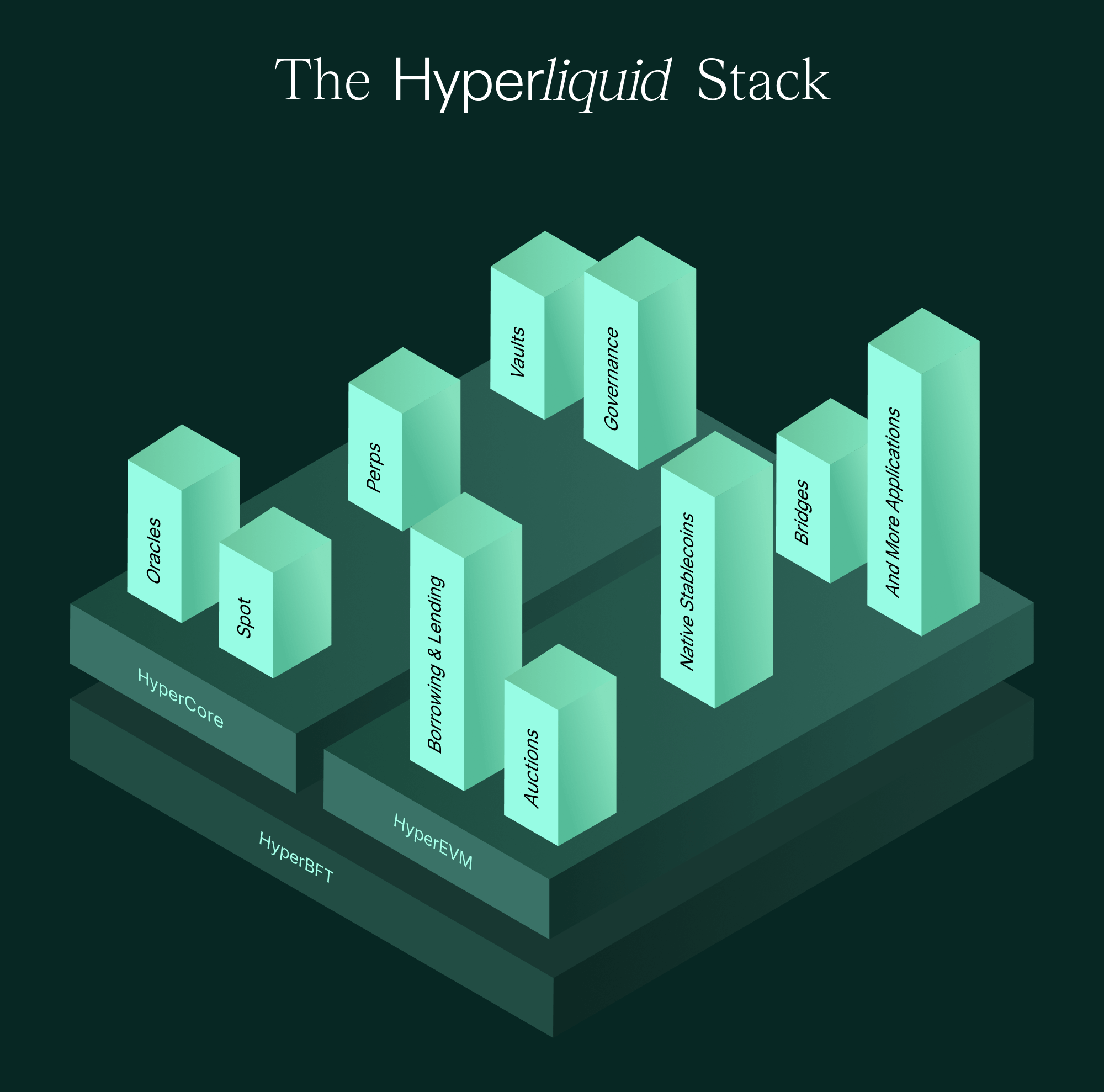 #### HyperCore
**HyperCore**, or Core, is a high-performance Layer 1 that manages the exchange’s onchain order books with one-block finality.
Communication with `HyperCore` is done via `L1 actions` or `actions`, as opposed to the usual RPC calls which are used for EVM chains. Full list of `L1 actions` here: [Exchange endpoint](https://hyperliquid.gitbook.io/hyperliquid-docs/for-developers/api/exchange-endpoint).
#### HyperEVM
**HyperEVM**, or EVM, is an Ethereum Virtual Machine (EVM)-compatible environment that allows developers to build decentralized applications (dApps).
You can interact with HyperEVM via traditional `eth_` RPC calls (full list here: [HyperEVM JSON-RPC](https://hyperliquid.gitbook.io/hyperliquid-docs/for-developers/hyperevm/json-rpc)).
`HyperEVM` has precompiles that let you interact with `HyperCore`, where spot and perpetual trading happens (and is probably why you are interested in going to Hyperliquid). If you are not listing on `HyperCore`, then HyperEVM is your almost standard EVM network - you just need to switch block sizes.
#### **Block Explorers:**
`HyperEVM` and `HyperCore` have their own block explorers. You can find ([a list of explorers here](https://hyperliquid-co.gitbook.io/community-docs/ecosystem/projects/tools#blockchain-explorers)).
### 2. Hyperliquid API
Hyperliquid supports several API functions that users can use on HyperCore to query information, following is an example.
```bash wrap theme={null}
curl -X POST https://api.hyperliquid-testnet.xyz/info \
-H "Content-Type: application/json" \
-d '{"type": "spotMeta"}'
```
This will give you the spot meta data for HyperCore. A sample response is below.
```json wrap theme={null}
{
"universe": [
{
"name": "ALICE",
"szDecimals": 0,
"weiDecimals": 6,
"index": 1231,
"tokenId": "0x503e1e612424896ec6e7a02c7350c963",
"isCanonical": false,
"evmContract": null,
"fullName": null,
"deployerTradingFeeShare": "1.0"
}
]
}
```
* The `tokenId` is the address of the token on `HyperCore`.
* The `evmContract` is the address of the `ERC20` token on `HyperEVM`.
* The `deployerTradingFeeShare` is the fee share for the deployer of the token.
### 3. HyperCore Actions
An action as defined by Hyperliquid is a transaction that is sent to the `HyperCore` - as it updates state on the `HyperCore` it needs to be a signed transaction from the wallet of the action sender.
You need to use `ethers-v6` to sign actions - [https://docs.ethers.org/v6/api/providers/#Signer-signTypedData](https://docs.ethers.org/v6/api/providers/#Signer-signTypedData)
```bash wrap theme={null}
# add ethers-v6 to your project as an alias for ethers@^6.13.5
pnpm add ethers-v6@npm:ethers@^6.13.5
```
```ts wrap theme={null}
import {Wallet} from 'ethers'; // ethers-v5 wallet
import {Wallet as ethersV6Wallet} from 'ethers-v6'; // ethers-v6 wallet
const signerv6 = new ethersV6Wallet(wallet.privateKey); // where wallet is an ethers.Wallet from ethers-v5
const signature = await signerv6.signTypedData(domain, types, message);
```
This is because in `ethers-v5` EIP-712 signing is not stable: [https://docs.ethers.org/v5/api/signer/#Signer-signTypedData](https://docs.ethers.org/v5/api/signer/#Signer-signTypedData)
> Experimental feature (this method name will change)
> This is still an experimental feature. If using it, please specify the exact version of ethers you are using (e.g. spcify "5.0.18", not "^5.0.18") as the method name will be renamed from \_signTypedData to signTypedData once it has been used in the field a bit.
You can use the official [Hyperliquid Python SDK](https://github.com/hyperliquid-dex/hyperliquid-python-sdk) to interact with `HyperCore`.
LayerZero also built an in-house minimal [TypeScript SDK](./hyperliquid-sdk) that focuses on switching blocks, deploying the `HyperCore` token, and connecting the `HyperCore` token to a `HyperEVM` ERC20 (OFT).
### 4. Accounts
You can use the same account (private key) on both `HyperEVM` and `HyperCore`. `HyperCore` uses signed Ethereum transactions to validate data.
### 5. Multi-Block Architecture
`HyperEVM` and `HyperCore` are separate entities, so they have separate blocks, interleaved by their creation order.
#### HyperEVM Blocks
`HyperEVM` has two kinds of blocks:
* **Small Blocks**: Default, 1-second block time, 2M gas limit. For high throughput transactions. OFT deployments are typically larger than 2M gas.
* **Big Blocks**: 1 transaction per block, 1 block per minute, 30M gas limit. For deploying large contracts.
You can toggle between block types for your account using an `L1 action` of type `evmUserModify`:
```json wrap theme={null}
{"type": "evmUserModify", "usingBigBlocks": true}
```
You can also switch to big blocks using [LayerZero Hyperliquid SDK](./hyperliquid-sdk#3-switching-blocks-evmusermodify) with a simple command:
```bash wrap theme={null}
npx @layerzerolabs/hyperliquid-composer set-block --size big --network mainnet --private-key $PRIVATE_KEY
```
Flagging a user for big blocks means all subsequent HyperEVM transactions from that user will be big block transactions until toggled off. To toggle back to small blocks, set `usingBigBlocks` to `false`.
Alternatively, use `bigBlockGasPrice` instead of `gasPrice` in transactions.
#### HyperCore Blocks
`HyperCore` has its own blocks, which means there are 3 block types in total.
As `HyperCore` and `HyperEVM` blocks are produced at different speeds, with `HyperCore` creating more than `HyperEVM`, the blocks are created in not a strictly alternating manner.
For example, the block sequence might look like this:
```
[Core] → [Core] → [EVM-small] → [Core] → [Core] → [EVM-small] → [Core] → [EVM-large] → [Core] → [EVM-small]
```
### 6. Precompiles and System Contracts
Hyperliquid uses precompiles in two ways: System Contracts and L1ActionPrecompiles.
**System Contracts**:
* `0x2222222222222222222222222222222222222222`: System contract address for the `HYPE` token.
* `0x200000000000000000000000000000000000abcd`: System contract address for a created Core Spot token (asset bridge).
* `0x3333333333333333333333333333333333333333`: The `CoreWriter` for sending transactions to HyperCore.
**L1ActionPrecompiles**:
* `0x0000000000000000000000000000000000000801`: `SpotBalance` precompile for reading token balances
* `0x0000000000000000000000000000000000000810`: `CoreUserExists` precompile for checking account activation
**Key Precompile Functions:**
* `spotBalance(address user, uint64 token)`: Returns balance information for a user's token holdings on HyperCore
* `coreUserExists(address user)`: Checks if a user account is activated on HyperCore
* `CoreWriter`: Writes to the first produced `HyperCore` block after the production of the EVM block
The Composer implementation uses these precompiles directly for reliable HyperCore interaction.
### 7. Token Standards
* **Token standard on HyperEVM**: `ERC20` (EVM Spot)
* **Token standard on HyperCore**: `HIP-1` (Core Spot)
Deploying a Core Spot token involves a 31-hour Dutch auction for a core spot index, followed by configuration.
### Critical Note on Hyperliquidity
Using the Hyperliquid UI for spot deployment ([https://app.hyperliquid.xyz/deploySpot](https://app.hyperliquid.xyz/deploySpot)) forces the use of "Hyperliquidity". **This is NOT supported by LayerZero** as it can lead to an uncollateralized asset bridge. Deploy via API/SDK to avoid this. The [LayerZero SDK](./hyperliquid-sdk) facilitates this.
### 8. The Asset Bridge: Linking EVM Spot (ERC20) and Core Spot (HIP-1)
For tokens to be transferable between `HyperEVM` and `HyperCore`, the EVM Spot (**ERC20**) and Core Spot (**HIP-1**) must be linked. This creates an **asset bridge precompile** at an address like `0x2000...abcd` (where `abcd` is the `coreIndexId` of the **HIP-1** in hexadecimal).
**Linking Process:**
1. **`requestEvmContract`**: Initiated by the HyperCore deployer, signaling intent to link HIP-1 to an ERC20.
2. **`finalizeEvmContract`**: Initiated by the HyperEVM deployer (EOA) to confirm the link.
**Asset Bridge Mechanics:**
The asset bridge (`0x2000...abcd`) acts like a lockbox.
* To send tokens from HyperEVM to HyperCore: Transfer ERC20 tokens to its asset bridge address on HyperEVM.
* To send tokens from HyperCore to HyperEVM: Use the `spotSend` L1 action, targeting the asset bridge address on HyperCore.
**Funding:**
For tokens to move into `HyperCore`, the deployer must mint the maximum supply (e.g., `u64.max` via API) of HIP-1 tokens to the token's asset bridge address on `HyperCore` (or to their deployer account and then transfer).
`u64.max` is the maximum value for a `u64` integer, which is `2^64 - 1`. It's a 20-digit number: `18,446,744,073,709,551,615` (18.4 quintillion, or `18` + 18 zeros)
Example of transition in bridge balances:
1. Initial state: `[AssetBridgeEVM: 0 | AssetBridgeCore: 0]`
2. Fund HyperCore bridge: `[AssetBridgeEVM: 0 | AssetBridgeCore: X]`
3. User bridges `X*scale` tokens from EVM to Core: User sends `X*scale` ERC20 to EVM bridge.
4. New state: `[AssetBridgeEVM: X*scale | AssetBridgeCore: 0]`
### Critical Warning on Bridge Capacity
Hyperliquid has **no checks** for asset bridge capacity. If you try to bridge more tokens than available on the destination side of the bridge, all tokens will be locked in the asset bridge address **forever**. The Hyperliquid Composer contract includes checks to refund users on `HyperEVM` if such a scenario is detected.
### Partial Funding Issue
"Partially funding" the HyperCore asset bridge is problematic. If initial funds are consumed (`[X.EVM | 0]`) and you add more `Y.Core` tokens to the HyperCore bridge, it might trigger a withdrawal of `X.EVM` tokens, leading to `[0 | Y.Core]` but with `X.Core` tokens (previously converted from `X.EVM`) still in circulation on HyperCore that cannot be withdrawn back to EVM.
**Always fully fund the HyperCore side of the asset bridge with the total intended circulatable supply via the bridge.**
### 9. Communication between HyperEVM and HyperCore
* **HyperEVM reads state from HyperCore**: Via `precompiles` (e.g., perp positions).
* **HyperEVM writes to HyperCore**: Via `events` at specific `precompile` addresses AND by transferring tokens through the asset bridge.
### 10. Transfers between HyperEVM and HyperCore
Spot assets can be sent from HyperEVM to HyperCore and vice versa. They are called `Core Spot` and `EVM Spot`. These are done by sending an `ERC20::transfer` with asset bridge address as the recipient.
To move tokens across:
1. Send tokens to the **asset bridge address** (`0x2000...abcd`) on the source network (HyperEVM or HyperCore).
* On HyperEVM, this is an `ERC20::transfer(assetBridgeAddress, value)`
* The event emitted is `Transfer(address from, address to, uint256 value)` → `Transfer(_from, assetBridgeAddress, value);`
* The `Transfer` event is picked up by Hyperliquid's backend.
2. The tokens are credited to your account on the destination network.
3. Then, on the destination network, send tokens from your address to the final receiver's address.
The [HyperliquidComposer](https://github.com/LayerZero-Labs/devtools/blob/main/packages/hyperliquid-composer/contracts/HyperLiquidComposer.sol) contract from [LayerZero Hyperliquid SDK](./hyperliquid-sdk) automates these actions.
### 11. Hyperliquid Composer
The Composer facilitates `X-network` → `HyperCore` OFT transfers.
**Why a Composer?**
Users might want to hold tokens on `HyperEVM` and only move to `HyperCore` for trading. Auto-conversion in `lzReceive` isn't ideal. An `lzCompose` function allows this flexibility.
**Mechanism:**
1. A LayerZero message sends tokens to Hyperliquid. `lzReceive` on the OFT on HyperEVM mints tokens to the `HyperLiquidComposer` contract address.
2. The `composeMsg` in `SendParam` (from the source chain call) contains the **actual receiver's address** on Hyperliquid.
3. The `HyperLiquidComposer`'s `lzCompose` function is triggered.
4. The Composer:
* Transfers the received EVM Spot tokens (ERC20) from itself to the token's **asset bridge address** (`0x2000...abcd`). This `Transfer` event signals Hyperliquid's backend to credit the tokens on HyperCore.
* Performs an `CoreWriter` transaction (to `0x33...33`) instructing HyperCore to execute a `spot transfer` of the corresponding HIP-1 tokens from the Composer's implied Core address (derived from its EVM address) to the **actual receiver's address** (from `composeMsg`) on HyperCore.
That particular `Transfer` event is what Hyperliquid nodes/relayers listen to in order to credit the `receiver` address on Core.
```solidity wrap theme={null}
struct SendParam {
uint32 dstEid;
bytes32 to; // OFT address (so that the OFT can execute the `compose` call)
uint256 amountLD;
uint256 minAmountLD;
bytes extraOptions;
bytes composeMsg; // token receiver address (msg.sender if you want your address to receive the token)
bytes oftCmd;
}
```
### Token Decimals
`HyperCore::HIP1` decimals can differ from `HyperEVM::ERC20` decimals. The Composer handles scaling. Amounts on HyperCore will reflect HIP-1 decimals. Converting back restores ERC20 decimals.
**Composer Contract:**
The composer is a separate contract deployed on HyperEVM that uses Hyperliquid precompiles directly.
```solidity wrap theme={null}
contract HyperLiquidComposer is HyperLiquidCore, ReentrancyGuard, IHyperLiquidComposer, IOAppComposer {
constructor(
address _oft, // The OFT contract address
uint64 _coreIndexId, // Core Spot token's index ID
int8 _assetDecimalDiff // Decimal difference: EVM decimals - Core decimals
) {
// Automatically configures both ERC20 and native HYPE support
// Uses precompiles for direct HyperCore interaction
}
function lzCompose(address _oft, bytes32 _guid, bytes calldata _message, address _executor, bytes calldata _extraData) external payable override {
// Error handling with failedMessages mapping
// Direct precompile calls for HyperCore interaction
// Built-in activation checks and refund mechanisms
}
}
```
### 12. LayerZero Transaction on HyperEVM
LayerZero OFT transfers to Hyperliquid use the compose pattern to enable automatic bridging from HyperEVM to HyperCore.
**How Compose Enables HyperCore Transfers:**
1. **OFT Delivery**: The LayerZero message delivers tokens to the `HyperLiquidComposer` contract address on HyperEVM
2. **Compose Message**: The `SendParam.composeMsg` contains the final recipient's address and any native HYPE amount needed
3. **Automatic Bridging**: The Composer's `lzCompose` function automatically bridges tokens from HyperEVM to HyperCore and transfers them to the final recipient
**ComposeMsg Encoding:**
The `composeMsg` uses a standardized 64-byte format that tells the Composer where to send tokens on HyperCore:
```solidity wrap theme={null}
// Encode the final recipient and optional HYPE amount
bytes memory composeMsg = abi.encode(
uint256 minMsgValue, // Minimum HYPE amount to send to recipient (0 if none)
address receiver // Final recipient address on HyperCore
);
```
This encoding allows the Composer to handle both ERC20 token bridging and optional native HYPE transfers in a single compose operation.
**Composer Logic:**
1. **Activation Check**: Uses `coreUserExists()` precompile to verify receiver is activated on HyperCore
2. **Bridge Capacity Check**: Uses `spotBalance()` precompile to check asset bridge capacity
3. **Dual Asset Support**: Handles both ERC20 tokens and native HYPE transfers
4. **Error Recovery**: Failed messages are stored in `failedMessages` mapping for later refund
**Implementation Details:**
```solidity wrap theme={null}
// Precompile-based approach
function lzCompose(address _oft, bytes32 _guid, bytes calldata _message, ...) external payable {
// 1. Decode message with enhanced validation
(uint256 minMsgValue, address receiver) = abi.decode(composeMsg, (uint256, address));
// 2. Check activation status via precompile
if (!coreUserExists(receiver).exists) revert CoreUserNotActivated();
// 3. Check bridge capacity via precompile
uint64 bridgeBalance = spotBalance(assetBridge, coreIndex).total;
// 4. Transfer to asset bridge
IERC20(token).safeTransfer(assetBridge, amounts.evm);
// 5. Use CoreWriter precompile for HyperCore transfer
_submitCoreWriterTransfer(receiver, coreIndex, amounts.core);
}
// Precompile-based CoreWriter call
function _submitCoreWriterTransfer(address _to, uint64 _coreIndex, uint64 _coreAmount) internal {
bytes memory action = abi.encode(_to, _coreIndex, _coreAmount);
bytes memory payload = abi.encodePacked(SPOT_SEND_HEADER, action); // Pre-computed header
ICoreWriter(HLP_CORE_WRITER).sendRawAction(payload);
}
```
**Error Handling Features:**
* **Failed Message Storage**: Messages that fail decoding are stored for crosschain refund
* **Automatic Refunds**: Failed transfers refund tokens to receiver on HyperEVM
* **Gas Protection**: Minimum gas requirements prevent out-of-gas failures
* **Bridge Capacity Protection**: Prevents token locking when bridge capacity is insufficient
#### HyperCore
**HyperCore**, or Core, is a high-performance Layer 1 that manages the exchange’s onchain order books with one-block finality.
Communication with `HyperCore` is done via `L1 actions` or `actions`, as opposed to the usual RPC calls which are used for EVM chains. Full list of `L1 actions` here: [Exchange endpoint](https://hyperliquid.gitbook.io/hyperliquid-docs/for-developers/api/exchange-endpoint).
#### HyperEVM
**HyperEVM**, or EVM, is an Ethereum Virtual Machine (EVM)-compatible environment that allows developers to build decentralized applications (dApps).
You can interact with HyperEVM via traditional `eth_` RPC calls (full list here: [HyperEVM JSON-RPC](https://hyperliquid.gitbook.io/hyperliquid-docs/for-developers/hyperevm/json-rpc)).
`HyperEVM` has precompiles that let you interact with `HyperCore`, where spot and perpetual trading happens (and is probably why you are interested in going to Hyperliquid). If you are not listing on `HyperCore`, then HyperEVM is your almost standard EVM network - you just need to switch block sizes.
#### **Block Explorers:**
`HyperEVM` and `HyperCore` have their own block explorers. You can find ([a list of explorers here](https://hyperliquid-co.gitbook.io/community-docs/ecosystem/projects/tools#blockchain-explorers)).
### 2. Hyperliquid API
Hyperliquid supports several API functions that users can use on HyperCore to query information, following is an example.
```bash wrap theme={null}
curl -X POST https://api.hyperliquid-testnet.xyz/info \
-H "Content-Type: application/json" \
-d '{"type": "spotMeta"}'
```
This will give you the spot meta data for HyperCore. A sample response is below.
```json wrap theme={null}
{
"universe": [
{
"name": "ALICE",
"szDecimals": 0,
"weiDecimals": 6,
"index": 1231,
"tokenId": "0x503e1e612424896ec6e7a02c7350c963",
"isCanonical": false,
"evmContract": null,
"fullName": null,
"deployerTradingFeeShare": "1.0"
}
]
}
```
* The `tokenId` is the address of the token on `HyperCore`.
* The `evmContract` is the address of the `ERC20` token on `HyperEVM`.
* The `deployerTradingFeeShare` is the fee share for the deployer of the token.
### 3. HyperCore Actions
An action as defined by Hyperliquid is a transaction that is sent to the `HyperCore` - as it updates state on the `HyperCore` it needs to be a signed transaction from the wallet of the action sender.
You need to use `ethers-v6` to sign actions - [https://docs.ethers.org/v6/api/providers/#Signer-signTypedData](https://docs.ethers.org/v6/api/providers/#Signer-signTypedData)
```bash wrap theme={null}
# add ethers-v6 to your project as an alias for ethers@^6.13.5
pnpm add ethers-v6@npm:ethers@^6.13.5
```
```ts wrap theme={null}
import {Wallet} from 'ethers'; // ethers-v5 wallet
import {Wallet as ethersV6Wallet} from 'ethers-v6'; // ethers-v6 wallet
const signerv6 = new ethersV6Wallet(wallet.privateKey); // where wallet is an ethers.Wallet from ethers-v5
const signature = await signerv6.signTypedData(domain, types, message);
```
This is because in `ethers-v5` EIP-712 signing is not stable: [https://docs.ethers.org/v5/api/signer/#Signer-signTypedData](https://docs.ethers.org/v5/api/signer/#Signer-signTypedData)
> Experimental feature (this method name will change)
> This is still an experimental feature. If using it, please specify the exact version of ethers you are using (e.g. spcify "5.0.18", not "^5.0.18") as the method name will be renamed from \_signTypedData to signTypedData once it has been used in the field a bit.
You can use the official [Hyperliquid Python SDK](https://github.com/hyperliquid-dex/hyperliquid-python-sdk) to interact with `HyperCore`.
LayerZero also built an in-house minimal [TypeScript SDK](./hyperliquid-sdk) that focuses on switching blocks, deploying the `HyperCore` token, and connecting the `HyperCore` token to a `HyperEVM` ERC20 (OFT).
### 4. Accounts
You can use the same account (private key) on both `HyperEVM` and `HyperCore`. `HyperCore` uses signed Ethereum transactions to validate data.
### 5. Multi-Block Architecture
`HyperEVM` and `HyperCore` are separate entities, so they have separate blocks, interleaved by their creation order.
#### HyperEVM Blocks
`HyperEVM` has two kinds of blocks:
* **Small Blocks**: Default, 1-second block time, 2M gas limit. For high throughput transactions. OFT deployments are typically larger than 2M gas.
* **Big Blocks**: 1 transaction per block, 1 block per minute, 30M gas limit. For deploying large contracts.
You can toggle between block types for your account using an `L1 action` of type `evmUserModify`:
```json wrap theme={null}
{"type": "evmUserModify", "usingBigBlocks": true}
```
You can also switch to big blocks using [LayerZero Hyperliquid SDK](./hyperliquid-sdk#3-switching-blocks-evmusermodify) with a simple command:
```bash wrap theme={null}
npx @layerzerolabs/hyperliquid-composer set-block --size big --network mainnet --private-key $PRIVATE_KEY
```
Flagging a user for big blocks means all subsequent HyperEVM transactions from that user will be big block transactions until toggled off. To toggle back to small blocks, set `usingBigBlocks` to `false`.
Alternatively, use `bigBlockGasPrice` instead of `gasPrice` in transactions.
#### HyperCore Blocks
`HyperCore` has its own blocks, which means there are 3 block types in total.
As `HyperCore` and `HyperEVM` blocks are produced at different speeds, with `HyperCore` creating more than `HyperEVM`, the blocks are created in not a strictly alternating manner.
For example, the block sequence might look like this:
```
[Core] → [Core] → [EVM-small] → [Core] → [Core] → [EVM-small] → [Core] → [EVM-large] → [Core] → [EVM-small]
```
### 6. Precompiles and System Contracts
Hyperliquid uses precompiles in two ways: System Contracts and L1ActionPrecompiles.
**System Contracts**:
* `0x2222222222222222222222222222222222222222`: System contract address for the `HYPE` token.
* `0x200000000000000000000000000000000000abcd`: System contract address for a created Core Spot token (asset bridge).
* `0x3333333333333333333333333333333333333333`: The `CoreWriter` for sending transactions to HyperCore.
**L1ActionPrecompiles**:
* `0x0000000000000000000000000000000000000801`: `SpotBalance` precompile for reading token balances
* `0x0000000000000000000000000000000000000810`: `CoreUserExists` precompile for checking account activation
**Key Precompile Functions:**
* `spotBalance(address user, uint64 token)`: Returns balance information for a user's token holdings on HyperCore
* `coreUserExists(address user)`: Checks if a user account is activated on HyperCore
* `CoreWriter`: Writes to the first produced `HyperCore` block after the production of the EVM block
The Composer implementation uses these precompiles directly for reliable HyperCore interaction.
### 7. Token Standards
* **Token standard on HyperEVM**: `ERC20` (EVM Spot)
* **Token standard on HyperCore**: `HIP-1` (Core Spot)
Deploying a Core Spot token involves a 31-hour Dutch auction for a core spot index, followed by configuration.
### Critical Note on Hyperliquidity
Using the Hyperliquid UI for spot deployment ([https://app.hyperliquid.xyz/deploySpot](https://app.hyperliquid.xyz/deploySpot)) forces the use of "Hyperliquidity". **This is NOT supported by LayerZero** as it can lead to an uncollateralized asset bridge. Deploy via API/SDK to avoid this. The [LayerZero SDK](./hyperliquid-sdk) facilitates this.
### 8. The Asset Bridge: Linking EVM Spot (ERC20) and Core Spot (HIP-1)
For tokens to be transferable between `HyperEVM` and `HyperCore`, the EVM Spot (**ERC20**) and Core Spot (**HIP-1**) must be linked. This creates an **asset bridge precompile** at an address like `0x2000...abcd` (where `abcd` is the `coreIndexId` of the **HIP-1** in hexadecimal).
**Linking Process:**
1. **`requestEvmContract`**: Initiated by the HyperCore deployer, signaling intent to link HIP-1 to an ERC20.
2. **`finalizeEvmContract`**: Initiated by the HyperEVM deployer (EOA) to confirm the link.
**Asset Bridge Mechanics:**
The asset bridge (`0x2000...abcd`) acts like a lockbox.
* To send tokens from HyperEVM to HyperCore: Transfer ERC20 tokens to its asset bridge address on HyperEVM.
* To send tokens from HyperCore to HyperEVM: Use the `spotSend` L1 action, targeting the asset bridge address on HyperCore.
**Funding:**
For tokens to move into `HyperCore`, the deployer must mint the maximum supply (e.g., `u64.max` via API) of HIP-1 tokens to the token's asset bridge address on `HyperCore` (or to their deployer account and then transfer).
`u64.max` is the maximum value for a `u64` integer, which is `2^64 - 1`. It's a 20-digit number: `18,446,744,073,709,551,615` (18.4 quintillion, or `18` + 18 zeros)
Example of transition in bridge balances:
1. Initial state: `[AssetBridgeEVM: 0 | AssetBridgeCore: 0]`
2. Fund HyperCore bridge: `[AssetBridgeEVM: 0 | AssetBridgeCore: X]`
3. User bridges `X*scale` tokens from EVM to Core: User sends `X*scale` ERC20 to EVM bridge.
4. New state: `[AssetBridgeEVM: X*scale | AssetBridgeCore: 0]`
### Critical Warning on Bridge Capacity
Hyperliquid has **no checks** for asset bridge capacity. If you try to bridge more tokens than available on the destination side of the bridge, all tokens will be locked in the asset bridge address **forever**. The Hyperliquid Composer contract includes checks to refund users on `HyperEVM` if such a scenario is detected.
### Partial Funding Issue
"Partially funding" the HyperCore asset bridge is problematic. If initial funds are consumed (`[X.EVM | 0]`) and you add more `Y.Core` tokens to the HyperCore bridge, it might trigger a withdrawal of `X.EVM` tokens, leading to `[0 | Y.Core]` but with `X.Core` tokens (previously converted from `X.EVM`) still in circulation on HyperCore that cannot be withdrawn back to EVM.
**Always fully fund the HyperCore side of the asset bridge with the total intended circulatable supply via the bridge.**
### 9. Communication between HyperEVM and HyperCore
* **HyperEVM reads state from HyperCore**: Via `precompiles` (e.g., perp positions).
* **HyperEVM writes to HyperCore**: Via `events` at specific `precompile` addresses AND by transferring tokens through the asset bridge.
### 10. Transfers between HyperEVM and HyperCore
Spot assets can be sent from HyperEVM to HyperCore and vice versa. They are called `Core Spot` and `EVM Spot`. These are done by sending an `ERC20::transfer` with asset bridge address as the recipient.
To move tokens across:
1. Send tokens to the **asset bridge address** (`0x2000...abcd`) on the source network (HyperEVM or HyperCore).
* On HyperEVM, this is an `ERC20::transfer(assetBridgeAddress, value)`
* The event emitted is `Transfer(address from, address to, uint256 value)` → `Transfer(_from, assetBridgeAddress, value);`
* The `Transfer` event is picked up by Hyperliquid's backend.
2. The tokens are credited to your account on the destination network.
3. Then, on the destination network, send tokens from your address to the final receiver's address.
The [HyperliquidComposer](https://github.com/LayerZero-Labs/devtools/blob/main/packages/hyperliquid-composer/contracts/HyperLiquidComposer.sol) contract from [LayerZero Hyperliquid SDK](./hyperliquid-sdk) automates these actions.
### 11. Hyperliquid Composer
The Composer facilitates `X-network` → `HyperCore` OFT transfers.
**Why a Composer?**
Users might want to hold tokens on `HyperEVM` and only move to `HyperCore` for trading. Auto-conversion in `lzReceive` isn't ideal. An `lzCompose` function allows this flexibility.
**Mechanism:**
1. A LayerZero message sends tokens to Hyperliquid. `lzReceive` on the OFT on HyperEVM mints tokens to the `HyperLiquidComposer` contract address.
2. The `composeMsg` in `SendParam` (from the source chain call) contains the **actual receiver's address** on Hyperliquid.
3. The `HyperLiquidComposer`'s `lzCompose` function is triggered.
4. The Composer:
* Transfers the received EVM Spot tokens (ERC20) from itself to the token's **asset bridge address** (`0x2000...abcd`). This `Transfer` event signals Hyperliquid's backend to credit the tokens on HyperCore.
* Performs an `CoreWriter` transaction (to `0x33...33`) instructing HyperCore to execute a `spot transfer` of the corresponding HIP-1 tokens from the Composer's implied Core address (derived from its EVM address) to the **actual receiver's address** (from `composeMsg`) on HyperCore.
That particular `Transfer` event is what Hyperliquid nodes/relayers listen to in order to credit the `receiver` address on Core.
```solidity wrap theme={null}
struct SendParam {
uint32 dstEid;
bytes32 to; // OFT address (so that the OFT can execute the `compose` call)
uint256 amountLD;
uint256 minAmountLD;
bytes extraOptions;
bytes composeMsg; // token receiver address (msg.sender if you want your address to receive the token)
bytes oftCmd;
}
```
### Token Decimals
`HyperCore::HIP1` decimals can differ from `HyperEVM::ERC20` decimals. The Composer handles scaling. Amounts on HyperCore will reflect HIP-1 decimals. Converting back restores ERC20 decimals.
**Composer Contract:**
The composer is a separate contract deployed on HyperEVM that uses Hyperliquid precompiles directly.
```solidity wrap theme={null}
contract HyperLiquidComposer is HyperLiquidCore, ReentrancyGuard, IHyperLiquidComposer, IOAppComposer {
constructor(
address _oft, // The OFT contract address
uint64 _coreIndexId, // Core Spot token's index ID
int8 _assetDecimalDiff // Decimal difference: EVM decimals - Core decimals
) {
// Automatically configures both ERC20 and native HYPE support
// Uses precompiles for direct HyperCore interaction
}
function lzCompose(address _oft, bytes32 _guid, bytes calldata _message, address _executor, bytes calldata _extraData) external payable override {
// Error handling with failedMessages mapping
// Direct precompile calls for HyperCore interaction
// Built-in activation checks and refund mechanisms
}
}
```
### 12. LayerZero Transaction on HyperEVM
LayerZero OFT transfers to Hyperliquid use the compose pattern to enable automatic bridging from HyperEVM to HyperCore.
**How Compose Enables HyperCore Transfers:**
1. **OFT Delivery**: The LayerZero message delivers tokens to the `HyperLiquidComposer` contract address on HyperEVM
2. **Compose Message**: The `SendParam.composeMsg` contains the final recipient's address and any native HYPE amount needed
3. **Automatic Bridging**: The Composer's `lzCompose` function automatically bridges tokens from HyperEVM to HyperCore and transfers them to the final recipient
**ComposeMsg Encoding:**
The `composeMsg` uses a standardized 64-byte format that tells the Composer where to send tokens on HyperCore:
```solidity wrap theme={null}
// Encode the final recipient and optional HYPE amount
bytes memory composeMsg = abi.encode(
uint256 minMsgValue, // Minimum HYPE amount to send to recipient (0 if none)
address receiver // Final recipient address on HyperCore
);
```
This encoding allows the Composer to handle both ERC20 token bridging and optional native HYPE transfers in a single compose operation.
**Composer Logic:**
1. **Activation Check**: Uses `coreUserExists()` precompile to verify receiver is activated on HyperCore
2. **Bridge Capacity Check**: Uses `spotBalance()` precompile to check asset bridge capacity
3. **Dual Asset Support**: Handles both ERC20 tokens and native HYPE transfers
4. **Error Recovery**: Failed messages are stored in `failedMessages` mapping for later refund
**Implementation Details:**
```solidity wrap theme={null}
// Precompile-based approach
function lzCompose(address _oft, bytes32 _guid, bytes calldata _message, ...) external payable {
// 1. Decode message with enhanced validation
(uint256 minMsgValue, address receiver) = abi.decode(composeMsg, (uint256, address));
// 2. Check activation status via precompile
if (!coreUserExists(receiver).exists) revert CoreUserNotActivated();
// 3. Check bridge capacity via precompile
uint64 bridgeBalance = spotBalance(assetBridge, coreIndex).total;
// 4. Transfer to asset bridge
IERC20(token).safeTransfer(assetBridge, amounts.evm);
// 5. Use CoreWriter precompile for HyperCore transfer
_submitCoreWriterTransfer(receiver, coreIndex, amounts.core);
}
// Precompile-based CoreWriter call
function _submitCoreWriterTransfer(address _to, uint64 _coreIndex, uint64 _coreAmount) internal {
bytes memory action = abi.encode(_to, _coreIndex, _coreAmount);
bytes memory payload = abi.encodePacked(SPOT_SEND_HEADER, action); // Pre-computed header
ICoreWriter(HLP_CORE_WRITER).sendRawAction(payload);
}
```
**Error Handling Features:**
* **Failed Message Storage**: Messages that fail decoding are stored for crosschain refund
* **Automatic Refunds**: Failed transfers refund tokens to receiver on HyperEVM
* **Gas Protection**: Minimum gas requirements prevent out-of-gas failures
* **Bridge Capacity Protection**: Prevents token locking when bridge capacity is insufficient