> ## Documentation Index
> Fetch the complete documentation index at: https://docs.layerzero.network/llms.txt
> Use this file to discover all available pages before exploring further.
# LayerZero V2 ONFT Quickstart
> Get started with ONFT Quickstart. Step-by-step tutorial for building omnichain applications on LayerZero V2. LayerZero enables secure crosschain messaging.
The **Omnichain Non-Fungible Token (ONFT) Standard** allows **non-fungible tokens (NFTs)** to be transferred across multiple blockchains without asset wrapping or middlechains.
* **ONFT Contract**: Uses a burn-and-mint mechanism. For a fluid NFT that can move directly between chains (e.g. Chain A and Chain B), you must deploy an ONFT contract on every chain. This creates a "mesh" of interconnected contracts.
* **ONFT Adapter**: Uses a lock-and-mint mechanism. If you already have an NFT collection on one chain and want to extend it omnichain, you deploy **a single ONFT Adapter on the source chain**. Then, you deploy ONFT contracts on any new chains where the collection will be transferred. Note that only one ONFT Adapter is allowed in the entire mesh.
This mesh concept is central to all LayerZero implementations: it represents the network of contracts that work together to enable omnichain NFT functionality.
### ONFT (Burn & Mint)
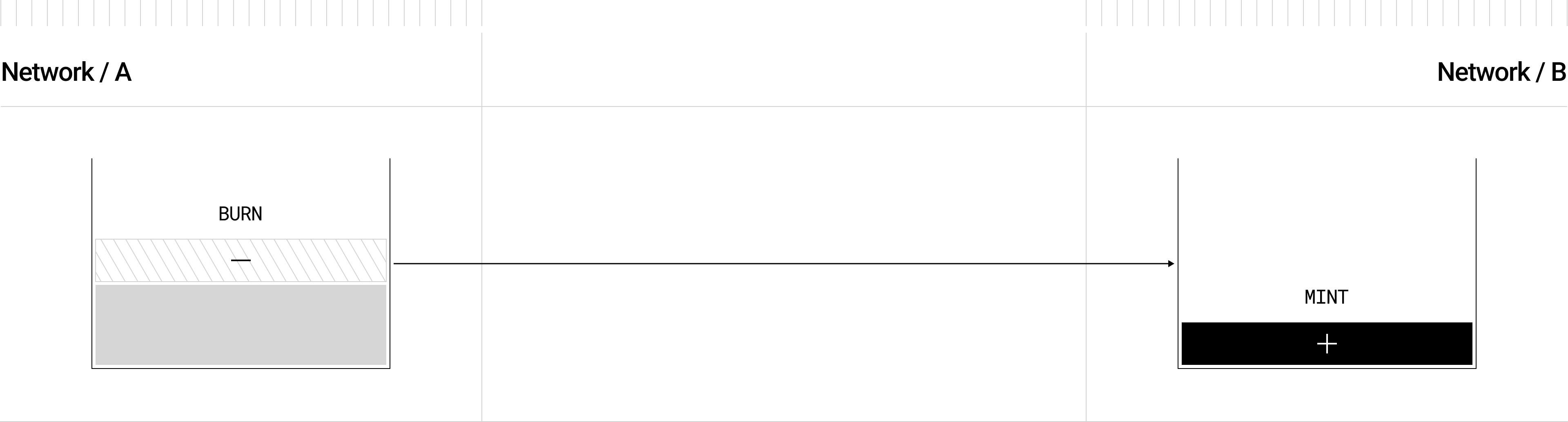
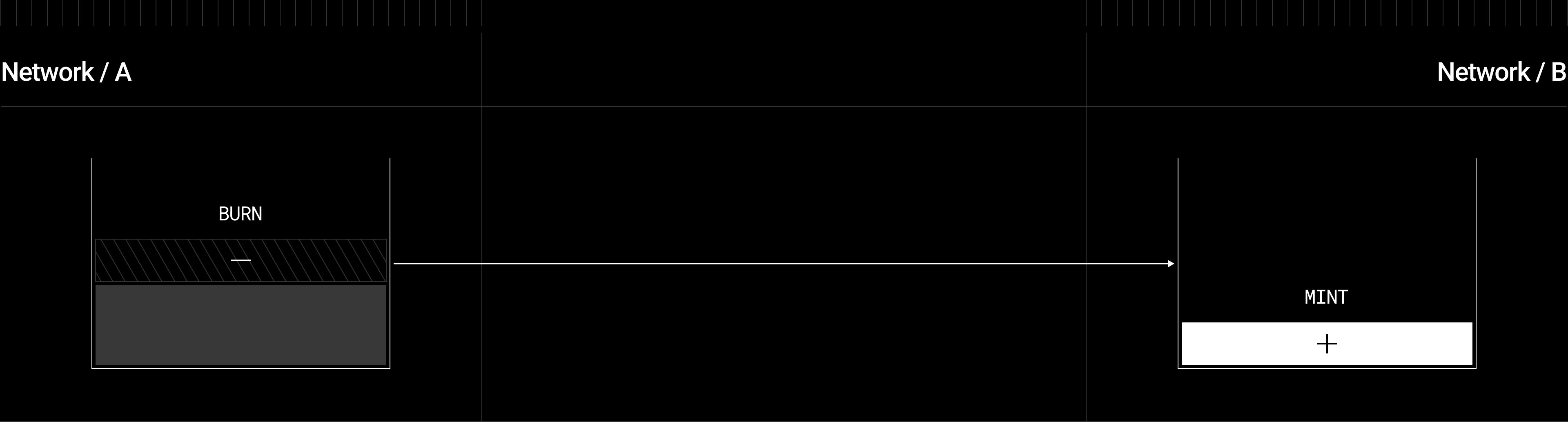 When using **ONFT**, tokens are **burned** on the source chain whenever an omnichain transfer is initiated. LayerZero sends a message to the destination contract instructing it to **mint** the same number of tokens that were burned, ensuring the overall token supply remains consistent.
```solidity wrap theme={null}
function _debit(address _from, uint256 _tokenId, uint32 /*_dstEid*/) internal virtual override {
if (_from != ERC721.ownerOf(_tokenId)) revert OnlyNFTOwner(_from, ERC721.ownerOf(_tokenId));
_burn(_tokenId);
}
function _credit(address _to, uint256 _tokenId, uint32 /*_srcEid*/) internal virtual override {
_mint(_to, _tokenId);
}
```
**Key Points**
* Default pattern for **new NFT collections**.
* `ONFT721` extends [`ERC721`](https://docs.openzeppelin.com/contracts/5.x/api/token/erc721#ERC721) (OpenZeppelin) and adds crosschain logic.
* Unified supply across chains is maintained by burning on source, minting on destination.
### ONFT Adapter (Lock & Mint)
When using **ONFT**, tokens are **burned** on the source chain whenever an omnichain transfer is initiated. LayerZero sends a message to the destination contract instructing it to **mint** the same number of tokens that were burned, ensuring the overall token supply remains consistent.
```solidity wrap theme={null}
function _debit(address _from, uint256 _tokenId, uint32 /*_dstEid*/) internal virtual override {
if (_from != ERC721.ownerOf(_tokenId)) revert OnlyNFTOwner(_from, ERC721.ownerOf(_tokenId));
_burn(_tokenId);
}
function _credit(address _to, uint256 _tokenId, uint32 /*_srcEid*/) internal virtual override {
_mint(_to, _tokenId);
}
```
**Key Points**
* Default pattern for **new NFT collections**.
* `ONFT721` extends [`ERC721`](https://docs.openzeppelin.com/contracts/5.x/api/token/erc721#ERC721) (OpenZeppelin) and adds crosschain logic.
* Unified supply across chains is maintained by burning on source, minting on destination.
### ONFT Adapter (Lock & Mint)

 When using **ONFT Adapter**, tokens are **locked** in a contract on the source chain, while the destination contract **mints** or **unlocks** the token after receiving a message from LayerZero. When bridging back, the minted token is **burned** on the remote side, and the original is **unlocked** on the source side.
```solidity wrap theme={null}
function _debit(address _from, uint256 _tokenId, uint32 /*_dstEid*/) internal virtual override {
// Lock the token by transferring it to this adapter contract
innerToken.transferFrom(_from, address(this), _tokenId);
}
function _credit(address _toAddress, uint256 _tokenId, uint32 /*_srcEid*/) internal virtual override {
// Unlock the token by transferring it back to the user
innerToken.transferFrom(address(this), _toAddress, _tokenId);
}
```
**Key Points**
* Suitable for **existing NFT collections**.
* The adapter contract is effectively a “lockbox” for your existing ERC721 tokens.
* No changes to your original NFT contract are required. Instead, the adapter implements the crosschain logic.
```solidity wrap ONFT theme={null}
// SPDX-License-Identifier: MIT
pragma solidity ^0.8.22;
import { ERC721 } from "@openzeppelin/contracts/token/ERC721/ERC721.sol";
import { ONFT721Core } from "./ONFT721Core.sol";
/**
* @title ONFT721 Contract
* @dev ONFT721 is an ERC-721 token that extends the functionality of the ONFT721Core contract.
*/
abstract contract ONFT721 is ONFT721Core, ERC721 {
string internal baseTokenURI;
event BaseURISet(string baseURI);
/**
* @dev Constructor for the ONFT721 contract.
* @param _name The name of the ONFT.
* @param _symbol The symbol of the ONFT.
* @param _lzEndpoint The LayerZero endpoint address.
* @param _delegate The delegate capable of making OApp configurations inside of the endpoint.
*/
constructor(
string memory _name,
string memory _symbol,
address _lzEndpoint,
address _delegate
) ERC721(_name, _symbol) ONFT721Core(_lzEndpoint, _delegate) {}
// @notice Retrieves the address of the underlying ERC721 implementation (ie. this contract).
function token() external view returns (address) {
return address(this);
}
function setBaseURI(string calldata _baseTokenURI) external onlyOwner {
baseTokenURI = _baseTokenURI;
emit BaseURISet(baseTokenURI);
}
function _baseURI() internal view override returns (string memory) {
return baseTokenURI;
}
/**
* @notice Indicates whether the ONFT721 contract requires approval of the 'token()' to send.
* @dev In the case of ONFT where the contract IS the token, approval is NOT required.
* @return requiresApproval Needs approval of the underlying token implementation.
*/
function approvalRequired() external pure virtual returns (bool) {
return false;
}
// highlight-start
// @dev Key crosschain overrides
function _debit(address _from, uint256 _tokenId, uint32 /*_dstEid*/) internal virtual override {
if (_from != ERC721.ownerOf(_tokenId)) revert OnlyNFTOwner(_from, ERC721.ownerOf(_tokenId));
_burn(_tokenId);
}
function _credit(address _to, uint256 _tokenId, uint32 /*_srcEid*/) internal virtual override {
_mint(_to, _tokenId);
}
// highlight-end
}
```
```solidity wrap ONFT Adapter theme={null}
// SPDX-License-Identifier: MIT
pragma solidity ^0.8.22;
import { IERC721 } from "@openzeppelin/contracts/token/ERC721/IERC721.sol";
import { ONFT721Core } from "./ONFT721Core.sol";
// @dev ONFT721Adapter is an adapter contract used to enable crosschain transferring of an existing ERC721 token.
abstract contract ONFT721Adapter is ONFT721Core {
IERC721 internal immutable innerToken;
/**
* @dev Constructor for the ONFT721 contract.
* @param _token The underlying ERC721 token address this adapts
* @param _lzEndpoint The LayerZero endpoint address.
* @param _delegate The delegate capable of making OApp configurations inside of the endpoint.
*/
constructor(address _token, address _lzEndpoint, address _delegate) ONFT721Core(_lzEndpoint, _delegate) {
innerToken = IERC721(_token);
}
// @notice Retrieves the address of the underlying ERC721 implementation (ie. external contract).
function token() external view returns (address) {
return address(innerToken);
}
/**
* @notice Indicates whether the ONFT721 contract requires approval of the 'token()' to send.
* @dev In the case of ONFT where the contract IS the token, approval is NOT required.
* @return requiresApproval Needs approval of the underlying token implementation.
*/
function approvalRequired() external pure virtual returns (bool) {
return true;
}
// highlight-start
// @dev Key crosschain overrides
function _debit(address _from, uint256 _tokenId, uint32 /*_dstEid*/) internal virtual override {
// @dev Dont need to check onERC721Received() when moving into this contract, ie. no 'safeTransferFrom' required
innerToken.transferFrom(_from, address(this), _tokenId);
}
function _credit(address _toAddress, uint256 _tokenId, uint32 /*_srcEid*/) internal virtual override {
// @dev Do not need to check onERC721Received() when moving out of this contract, ie. no 'safeTransferFrom'
// required
// @dev The default implementation does not implement IERC721Receiver as 'safeTransferFrom' is not used.
// @dev If IERC721Receiver is required, ensure proper re-entrancy protection is implemented.
innerToken.transferFrom(address(this), _toAddress, _tokenId);
}
// highlight-end
}
```
## Installation
To start using the `ONFT721` and `ONFT721Adapter` contracts, you can either create a new project via the LayerZero CLI or add the contract package to an existing project:
### New project
If you're creating a new contract, LayerZero provides [`create-lz-oapp`](../../../get-started/create-lz-oapp/start), an npx package that allows developers to create any omnichain application in **less than 4 minutes**. Get started by running the following from your command line and choose `ONFT721` when asked about a starting point. It will create both `ONFT721` and `ONFT721Adapter` contracts for your project.
```bash wrap theme={null}
npx create-lz-oapp@latest
```
### Existing project
To use ONFT in your existing project, install the [**@layerzerolabs/onft-evm**](https://www.npmjs.com/package/@layerzerolabs/onft-evm) package. This library provides both `ONFT721` (burn-and-mint) and `ONFT721Adapter` (lock-and-mint) variants.
```bash wrap theme={null}
npm install @layerzerolabs/onft-evm
```
```bash wrap theme={null}
yarn add @layerzerolabs/onft-evm
```
```bash wrap theme={null}
pnpm add @layerzerolabs/onft-evm
```
```bash wrap theme={null}
forge init
```
```bash wrap theme={null}
forge install layerzero-labs/devtools
forge install layerzero-labs/LayerZero-v2
forge install OpenZeppelin/openzeppelin-contracts
git submodule add https://github.com/GNSPS/solidity-bytes-utils.git lib/solidity-bytes-utils
```
Then add to your `foundry.toml` under `[profile.default]`:
```toml wrap theme={null}
[profile.default]
src = "src"
out = "out"
libs = ["lib"]
remappings = [
'@layerzerolabs/onft-evm/=lib/devtools/packages/onft-evm/',
'@layerzerolabs/oapp-evm/=lib/devtools/packages/oapp-evm/',
'@layerzerolabs/lz-evm-protocol-v2/=lib/layerzero-v2/packages/layerzero-v2/evm/protocol',
'@layerzerolabs/lz-evm-messagelib-v2/=lib/layerzero-v2/packages/layerzero-v2/evm/messagelib',
'@openzeppelin/contracts/=lib/openzeppelin-contracts/contracts/',
'solidity-bytes-utils/=lib/solidity-bytes-utils/',
]
# See more config options https://github.com/foundry-rs/foundry/blob/master/crates/config/README.md#all-options
```
LayerZero contracts work with both [**OpenZeppelin V5**](https://docs.openzeppelin.com/contracts/5.x/erc721) and V4 contracts. Specify your desired version in your project's package.json:
```json wrap theme={null}
"resolutions": {
"@openzeppelin/contracts": "^5.0.1",
}
```
To create an ONFT, you should decide which implementation is appropriate for your use case:
1. Use `ONFT721` when you're creating a new NFT collection that will exist on multiple chains.
2. Use `ONFT721Adapter` when you need to make an existing NFT collection crosschain compatible.
#### ONFT721 Implementation
Deploy an **ONFT** that inherits from `ONFT721`, which combines `ERC721` with the crosschain functionality needed for omnichain transfers. The contract automatically handles token burning on the source chain and minting on the destination chain.
You can pass in your chosen contract name, symbol, the LayerZero Endpoint address, and the contract's delegate (owner or governance address). This contract becomes the "canonical" NFT on every chain.
```solidity wrap theme={null}
// SPDX-License-Identifier: UNLICENSED
pragma solidity ^0.8.22;
import { ONFT721 } from "@layerzerolabs/onft-evm/contracts/onft721/ONFT721.sol";
contract MyONFT721 is ONFT721 {
constructor(
string memory _name,
string memory _symbol,
address _lzEndpoint,
address _delegate
) ONFT721(_name, _symbol, _lzEndpoint, _delegate) {}
}
```
#### ONFT721Adapter Implementation
Deploy an **ONFT Adapter** that references your existing NFT contract address.
The `ONFT721Adapter` constructor takes an additional parameter `_token`, which is the address of the existing `ERC721` token that you want to make crosschain compatible.
```solidity wrap theme={null}
// SPDX-License-Identifier: UNLICENSED
pragma solidity ^0.8.22;
import { ONFT721Adapter } from "@layerzerolabs/onft-evm/contracts/onft721/ONFT721Adapter.sol";
contract MyONFT721Adapter is ONFT721Adapter {
constructor(
address _token,
address _lzEndpoint,
address _delegate
) ONFT721Adapter(_token, _lzEndpoint, _delegate) {}
}
```
### Warning
There can only be one ONFT Adapter used for a specific `ERC721` token, and it should be deployed on the chain where the original `ERC721` token is located. On all the other chains where you want to use the ONFT, you only need an `ONFT721` contract.
## Deployment Workflow
The deployment process for ONFT contracts involves several steps, which we'll cover in detail:
1. **Deploy the ONFT** or ONFT Adapter contracts to all the chains you want to connect.
2. **Configure peer relationships** between contracts on different chains.
3. **Set security parameters** including Decentralized Validator Networks (DVNs).
4. **Configure message execution options**.
### 1. Deploy ONFT Contracts
First, deploy your ONFT contracts to all the chains you want to connect:
For new NFT collections:
* Deploy `MyONFT721` on all chains.
For existing NFT collections:
* Deploy `MyONFT721Adapter` on the chain where the original NFT exists.
* Deploy `MyONFT721` on all other chains you want to connect.
### 2. Configure Security Parameters
**Production deployments should use multiple required DVNs from independent operators.** A single-DVN configuration means a compromise of that one verifier results in unrestricted forged messages on the pathway. See the [Integration Checklist](../../../tools/integration-checklist#set-security-and-executor-configurations-on-every-pathway) for production DVN guidance.
Set the DVN configuration, including block confirmations, security thresholds, executor settings, and messaging libraries:
```solidity wrap theme={null}
EndpointV2.setSendLibrary(aONFT, bEid, newLib)
EndpointV2.setReceiveLibrary(aONFT, bEid, newLib, gracePeriod)
EndpointV2.setReceiveLibraryTimeout(aONFT, bEid, lib, gracePeriod)
EndpointV2.setConfig(aONFT, sendLibrary, sendConfig)
EndpointV2.setConfig(aONFT, receiveLibrary, receiveConfig)
EndpointV2.setDelegate(delegate)
```
These configurations are stored in the `EndpointV2` contract and control how messages are verified and executed. If you don't set custom configurations, the system will use default configurations set by LayerZero Labs.
**We strongly recommend reviewing these settings carefully and configuring your security stack according to your needs and preferences**.
You can find example scripts to make these calls in [Security and Executor Configuration](../configuration/dvn-executor-config).
### 3. Configure Peer Relationships
After deployment, you need to call `setPeer` on each contract to establish trust between ONFT contracts on different chains.
Set peers by calling `setPeer(dstEid, addressToBytes32(remoteONFT))` on every chain. This whitelists each destination as the trusted contract to receive your message.
```solidity wrap theme={null}
uint32 aEid = 1; // Example endpoint id for Chain A
uint32 bEid = 2; // Example endpoint id for Chain B
MyONFT721 aONFT; // Contract deployed on Chain A
MyONFT721 bONFT; // Contract deployed on Chain B
// Call on both sides for each pathway
// On chain A
aONFT.setPeer(bEid, addressToBytes32(address(bONFT)));
// On chain B
bONFT.setPeer(aEid, addressToBytes32(address(aONFT)));
```
The actual endpoint ids will vary per chain, see [Supported Chains](../../../deployments/deployed-contracts) for endpoint id reference.
### 4. Configure Message Execution Options
*\[Optional but recommended]*
ONFT inherits `OAppOptionsType3` from the `OApp` standard. This means you can define:
1. **enforcedOptions**: A contract-wide default that every `send` must abide by (e.g. minimum gas for `lzReceive`, or a maximum message size).
2. **extraOptions**: A call-specific set of execution settings or advanced features, such as adding a “composed” message on the remote side.
```solidity wrap theme={null}
// Recommended gas setting for ONFT transfers
EnforcedOptionParam[] memory aEnforcedOptions = new EnforcedOptionParam[](1);
// Force 65k gas on the remote (chain B) when bridging from chain A
aEnforcedOptions[0] = EnforcedOptionParam({
eid: bEid, // Remote chain id (chain B)
msgType: SEND,
options: OptionsBuilder.newOptions().addExecutorLzReceiveOption(100_000, 0) // Gas limit, msg.value
});
aONFT.setEnforcedOptions(aEnforcedOptions);
```
This ensures every user who calls `myONFT.send(...)` must pay at least `100_000` gas on the remote chain for the bridging operation. This is useful for ensuring there's enough gas on the destination chain to execute the bridging operation and to receive the bridged tokens.
`enforcedOptions` should only be set for `msgType: SEND`, to make sure there's enough gas on the destination chain to execute the bridging operation and to receive the bridged tokens.
See [Message Execution Options](../configuration/options) for more details.
## Using ONFT Contracts
#### Estimating Gas Fees
Before calling `send`, you'll typically want to estimate the fee using `quoteSend`.
Similar to OFT, you can call `quoteSend(...)` to get an estimate of how much `msg.value` you need to pass when bridging an NFT crosschain. This function takes in the same parameters as `send` but does not actually initiate the transfer. Instead, it queries the Endpoint for an estimated cost in `nativeFee`.
Arguments of the estimate function:
1. `SendParam` *(struct)*: which parameters should be used for the `send` operation?
```solidity wrap theme={null}
struct SendParam {
uint32 dstEid; // Destination LayerZero EndpointV2 ID.
bytes32 to; // Recipient address.
uint256 tokenId;
bytes extraOptions; // Additional options supplied by the caller to be used in the LayerZero message.
bytes composeMsg; // The composed message for the send() operation.
bytes onftCmd; // The ONFT command to be executed, unused in default ONFT implementations.
}
```
2. `payInLzToken` *(bool)*: which token (native or LZ token) will be used to pay for the transaction? `true` for LZ token and `false` for native token.
This lets us construct the `quoteSend` function:
```solidity wrap theme={null}
// @notice Provides a quote for the send() operation.
// @param _sendParam The parameters for the send() operation.
// @param _payInLzToken Flag indicating whether the caller is paying in the LZ token.
// @return msgFee The calculated LayerZero messaging fee from the send() operation.
function quoteSend(
SendParam calldata _sendParam,
bool _payInLzToken
) external view virtual returns (MessagingFee memory msgFee) {
(bytes memory message, bytes memory options) = _buildMsgAndOptions(_sendParam);
return _quote(_sendParam.dstEid, message, options, _payInLzToken);
}
```
We now have everything we need to be able to send the NFT crosschain:
* `SendParam` struct with all the parameters needed to send the NFT crosschain
* `quoteSend` function to estimate the fee before sending the NFT crosschain
* `refundAddress` parameter to specify the address to refund if the transaction fails on the source chain (default is the sender's address)
Let's send some NFTs across the chains!
#### Sending NFTs Across Chains
To transfer an NFT to another chain, users call the `send` function with appropriate parameters:
```solidity wrap theme={null}
function send(
SendParam calldata _sendParam, // Parameters for the send() operation.
MessagingFee calldata _fee, // The calculated LayerZero messaging fee from the send() operation.
address _refundAddress // The address to refund if the transaction fails on the source chain.
) external payable virtual returns (MessagingReceipt memory msgReceipt) {
_debit(msg.sender, _sendParam.tokenId, _sendParam.dstEid); // Debit the sender's balance.
(bytes memory message, bytes memory options) = _buildMsgAndOptions(_sendParam);
// @dev Sends the message to the LayerZero Endpoint, returning the MessagingReceipt.
msgReceipt = _lzSend(_sendParam.dstEid, message, options, _fee, _refundAddress);
emit ONFTSent(msgReceipt.guid, _sendParam.dstEid, msg.sender, _sendParam.tokenId);
}
```
You can override the `_debit` function with any additional logic you want to execute before the message is sent via the protocol, for example, taking custom fees.
#### Example Client Code
Here's how the `send` function can be called, as a Hardhat task for an ONFT Adapter contract:
```js wrap theme={null}
import {task} from 'hardhat/config';
import { Options, addressToBytes32 } from '@layerzerolabs/lz-v2-utilities'
import {BigNumberish, BytesLike} from 'ethers';
interface SendParam {
dstEid: BigNumberish // Destination LayerZero EndpointV2 ID.
to: BytesLike // Recipient address.
tokenId: BigNumberish // Token ID of the NFT to send.
extraOptions: BytesLike // Additional options supplied by the caller to be used in the LayerZero message.
composeMsg: BytesLike // The composed message for the send() operation.
onftCmd: BytesLike // The ONFT command to be executed, unused in default ONFT implementations.
}
task('send-nft', 'Sends an NFT from chain A to chain B using MyONFTAdapter')
.addParam('adapter', 'Address of MyONFTAdapter contract on source chain')
.addParam('dstEndpointId', 'Destination chain endpoint ID')
.addParam('recipient', 'Recipient on the destination chain')
.addParam('tokenId', 'Token ID to send')
.setAction(async (taskArgs, { ethers, deployments }) => {
const { adapter, dstEndpointId, recipient, tokenId } = taskArgs
const [signer] = await ethers.getSigners()
const adapterDeployment = await deployments.get('MyONFT721Adapter')
// Get adapter contract instance
const adapterContract = new ethers.Contract(adapterDeployment.address, adapterDeployment.abi, signer)
// Get the underlying ERC721 token address
const tokenAddress = await adapterContract.token()
const erc721Contract = await ethers.getContractAt('IERC721', tokenAddress)
// Check and set approval for specific token ID
const approved = await erc721Contract.getApproved(tokenId)
if (approved.toLowerCase() !== adapterDeployment.address.toLowerCase()) {
const approveTx = await erc721Contract.approve(adapterDeployment.address, tokenId)
await approveTx.wait() // Grant approval for specific token ID
}
// Build the parameters
const sendParam: SendParam = {
dstEid: dstEndpointId,
to: addressToBytes32(recipient), // convert to bytes32
tokenId: tokenId,
extraOptions: '0x', // If you want to pass custom options
composeMsg: '0x', // If you want additional logic on the remote chain
onftCmd: '0x',
}
// Get quote for the transfer
const quotedFee = await adapterContract.quoteSend(sendParam, false)
// Send the NFT, using the returned quoted fee in msg.value
const tx = await adapterContract.send(
sendParam,
quotedFee,
signer.address,
{ value: quotedFee.nativeFee }
)
const receipt = await tx.wait()
console.log('🎉 NFT sent! Transaction hash:', receipt.transactionHash)
})
```
You can put this task in `sendNFT.ts` in the `tasks` directory and run the command below to send the NFT.
This assumes that you have already deployed the adapter contract on Sepolia (testnet) and are sending the NFT to a recipient on Polygon Amoy (testnet).
```bash wrap theme={null}
npx hardhat send-nft \
--adapter 0x05EBb5dBefE45451Da5aA367CA0c39E715E85c99 \ # ONFTAdapter address on Sepolia
--dst-endpoint-id 40267 \ # Destination chain endpoint ID (Amoy)
--recipient 0x777A711938F0E40d8dd8cB457aE0AB3596Bd476d \ # Recipient address on Amoy
--token-id 7 \ # Token ID of the NFT you want to send
--network sepolia-testnet # Network you're sending from
```
When you call `send`:
* **ONFT** will `_burn` in the source chain contract, `_mint` in the destination chain contract.
* **ONFT Adapter** will `transferFrom(...)` tokens into itself on the source chain (locking them), then `_mint` or `_unlock` on the destination.
#### Receiving the NFT (`_lzReceive`)
A successful `send` call will be delivered to the destination chain, invoking the `_lzReceive` method during execution on that chain:
```solidity wrap theme={null}
function _lzReceive(
Origin calldata _origin,
bytes32 _guid,
bytes calldata _message,
address /*_executor*/, // @dev unused in the default implementation.
bytes calldata /*_extraData*/ // @dev unused in the default implementation.
) internal virtual override {
address toAddress = _message.sendTo().bytes32ToAddress();
uint256 tokenId = _message.tokenId();
// Mint / unlock the NFT to the recipient
_credit(toAddress, tokenId, _origin.srcEid);
// If there's a "composeMsg" for extra logic, handle it here...
if (_message.isComposed()) {
// ...
}
emit ONFTReceived(_guid, _origin.srcEid, toAddress, tokenId);
}
```
You can see each step in [ONFT721Core.sol](https://github.com/LayerZero-Labs/devtools/blob/main/packages/onft-evm/contracts/onft721/ONFT721Core.sol).
## Advanced Features
### Composed Messages
ONFT supports composed messages, allowing you to execute additional logic on the destination chain as part of the NFT transfer. When the `composeMsg` parameter is not empty, after the NFT is minted on the destination chain, the composed message will be executed in a separate transaction.
For advanced use cases, you can leverage this feature to:
* Trigger additional actions when an NFT arrives
* Integrate with other protocols on the destination chain
* Implement crosschain NFT marketplace functionality
### ONFT721Enumerable
For collections that need enumeration capabilities, LayerZero provides an `ONFT721Enumerable` contract that extends `ONFT721` with the [ERC721Enumerable](https://docs.openzeppelin.com/contracts/5.x/api/token/erc721#ERC721Enumerable) functionality:
```solidity wrap theme={null}
abstract contract ONFT721Enumerable is ONFT721Core, ERC721Enumerable {
// Implementation details...
}
```
This is useful for applications that need to enumerate or track all tokens within the collection.
## Example: Complete End-to-End Deployment Flow
Here's a complete example showing how to deploy and configure an ONFT system with an existing NFT collection on Ethereum and bridging to Polygon:
1. **Create a new OApp with CLI**
```bash wrap theme={null}
npx create-lz-oapp@latest
```
Choose `ONFT721` as the starting point.
2. **Configure OApp**
* Modify `layerzero.config.ts` to configure the OApp and add all the chains you want your ONFT to be available on.
* Add private key to `.env` file
* Modify `hardhat.config.ts` to add the networks you want to deploy to
3. **Deploy Contracts**:
Adapt the contracts to your needs and deploy them using Hardhat:
```bash wrap theme={null}
npx hardhat lz:deploy
```
You'll be able to choose which chains you want to deploy to.
4. **Configure Peers**:
Now that everything is deployed, it's time to wire all the contracts together.
The fastest way is to use the CLI:
```bash wrap theme={null}
npx hardhat lz:oapp:wire --oapp-config layerzero.config.ts
```
5. **Verify Setup**
Verify that everything was wired up correctly:
```bash wrap theme={null}
npx hardhat lz:oapp:peers:get --oapp-config layerzero.config.ts
```
Verify configurations:
```bash wrap theme={null}
npx hardhat lz:oapp:config:get:default # Outputs the default OApp config
npx hardhat lz:oapp:config:get # Outputs Custom OApp Config, Default OApp Config, and Active OApp Config. Each config contains Send & Receive Libraries, Send Uln & Executor Configs, and Receive Executor Configs
```
In the output of the config command above:
* **Custom OApp config**: what you customized in your OApp
* **Default OApp config**: the defaults that are applied if you don't customize anything
* **Active OApp config**: the config that is currently active (essentially, default + your applied customizations)
And you are now ready to send the NFT across all your configured chains! 🎉
## Security Considerations
When deploying ONFT contracts, consider the following security aspects:
1. **Peer Configuration**: Only set trusted contract addresses as peers to prevent unauthorized minting.
2. **DVN Settings**: Use multiple required DVNs from independent operators in production. A single-DVN configuration means a compromise of that one verifier results in unrestricted forged messages on the pathway. See the [Integration Checklist](../../../tools/integration-checklist#set-security-and-executor-configurations-on-every-pathway).
3. **Gas Limits**: Set appropriate gas limits in `enforceOptions` to prevent out-of-gas errors.
4. **Ownership Controls**: Implement proper access controls for administrative functions.
5. **Timeouts and Recovery**: Understand how message timeouts work and prepare recovery procedures.
## Next Steps
The ONFT standard provides a powerful way to create truly crosschain NFT collections. By understanding the core concepts and following the deployment guidelines outlined in this document, you can build robust omnichain NFT applications that leverage LayerZero's secure messaging protocol.
For more information, explore these related resources:
* [OApp Contract Standard](../oapp/overview)
* [Security and Executor Configuration](../configuration/dvn-executor-config)
* [Message Execution Options](../configuration/options)
* [LayerZero Endpoint Addresses](../../../deployments/deployed-contracts)
**You’re ready to build omnichain NFTs!**
When using **ONFT Adapter**, tokens are **locked** in a contract on the source chain, while the destination contract **mints** or **unlocks** the token after receiving a message from LayerZero. When bridging back, the minted token is **burned** on the remote side, and the original is **unlocked** on the source side.
```solidity wrap theme={null}
function _debit(address _from, uint256 _tokenId, uint32 /*_dstEid*/) internal virtual override {
// Lock the token by transferring it to this adapter contract
innerToken.transferFrom(_from, address(this), _tokenId);
}
function _credit(address _toAddress, uint256 _tokenId, uint32 /*_srcEid*/) internal virtual override {
// Unlock the token by transferring it back to the user
innerToken.transferFrom(address(this), _toAddress, _tokenId);
}
```
**Key Points**
* Suitable for **existing NFT collections**.
* The adapter contract is effectively a “lockbox” for your existing ERC721 tokens.
* No changes to your original NFT contract are required. Instead, the adapter implements the crosschain logic.
```solidity wrap ONFT theme={null}
// SPDX-License-Identifier: MIT
pragma solidity ^0.8.22;
import { ERC721 } from "@openzeppelin/contracts/token/ERC721/ERC721.sol";
import { ONFT721Core } from "./ONFT721Core.sol";
/**
* @title ONFT721 Contract
* @dev ONFT721 is an ERC-721 token that extends the functionality of the ONFT721Core contract.
*/
abstract contract ONFT721 is ONFT721Core, ERC721 {
string internal baseTokenURI;
event BaseURISet(string baseURI);
/**
* @dev Constructor for the ONFT721 contract.
* @param _name The name of the ONFT.
* @param _symbol The symbol of the ONFT.
* @param _lzEndpoint The LayerZero endpoint address.
* @param _delegate The delegate capable of making OApp configurations inside of the endpoint.
*/
constructor(
string memory _name,
string memory _symbol,
address _lzEndpoint,
address _delegate
) ERC721(_name, _symbol) ONFT721Core(_lzEndpoint, _delegate) {}
// @notice Retrieves the address of the underlying ERC721 implementation (ie. this contract).
function token() external view returns (address) {
return address(this);
}
function setBaseURI(string calldata _baseTokenURI) external onlyOwner {
baseTokenURI = _baseTokenURI;
emit BaseURISet(baseTokenURI);
}
function _baseURI() internal view override returns (string memory) {
return baseTokenURI;
}
/**
* @notice Indicates whether the ONFT721 contract requires approval of the 'token()' to send.
* @dev In the case of ONFT where the contract IS the token, approval is NOT required.
* @return requiresApproval Needs approval of the underlying token implementation.
*/
function approvalRequired() external pure virtual returns (bool) {
return false;
}
// highlight-start
// @dev Key crosschain overrides
function _debit(address _from, uint256 _tokenId, uint32 /*_dstEid*/) internal virtual override {
if (_from != ERC721.ownerOf(_tokenId)) revert OnlyNFTOwner(_from, ERC721.ownerOf(_tokenId));
_burn(_tokenId);
}
function _credit(address _to, uint256 _tokenId, uint32 /*_srcEid*/) internal virtual override {
_mint(_to, _tokenId);
}
// highlight-end
}
```
```solidity wrap ONFT Adapter theme={null}
// SPDX-License-Identifier: MIT
pragma solidity ^0.8.22;
import { IERC721 } from "@openzeppelin/contracts/token/ERC721/IERC721.sol";
import { ONFT721Core } from "./ONFT721Core.sol";
// @dev ONFT721Adapter is an adapter contract used to enable crosschain transferring of an existing ERC721 token.
abstract contract ONFT721Adapter is ONFT721Core {
IERC721 internal immutable innerToken;
/**
* @dev Constructor for the ONFT721 contract.
* @param _token The underlying ERC721 token address this adapts
* @param _lzEndpoint The LayerZero endpoint address.
* @param _delegate The delegate capable of making OApp configurations inside of the endpoint.
*/
constructor(address _token, address _lzEndpoint, address _delegate) ONFT721Core(_lzEndpoint, _delegate) {
innerToken = IERC721(_token);
}
// @notice Retrieves the address of the underlying ERC721 implementation (ie. external contract).
function token() external view returns (address) {
return address(innerToken);
}
/**
* @notice Indicates whether the ONFT721 contract requires approval of the 'token()' to send.
* @dev In the case of ONFT where the contract IS the token, approval is NOT required.
* @return requiresApproval Needs approval of the underlying token implementation.
*/
function approvalRequired() external pure virtual returns (bool) {
return true;
}
// highlight-start
// @dev Key crosschain overrides
function _debit(address _from, uint256 _tokenId, uint32 /*_dstEid*/) internal virtual override {
// @dev Dont need to check onERC721Received() when moving into this contract, ie. no 'safeTransferFrom' required
innerToken.transferFrom(_from, address(this), _tokenId);
}
function _credit(address _toAddress, uint256 _tokenId, uint32 /*_srcEid*/) internal virtual override {
// @dev Do not need to check onERC721Received() when moving out of this contract, ie. no 'safeTransferFrom'
// required
// @dev The default implementation does not implement IERC721Receiver as 'safeTransferFrom' is not used.
// @dev If IERC721Receiver is required, ensure proper re-entrancy protection is implemented.
innerToken.transferFrom(address(this), _toAddress, _tokenId);
}
// highlight-end
}
```
## Installation
To start using the `ONFT721` and `ONFT721Adapter` contracts, you can either create a new project via the LayerZero CLI or add the contract package to an existing project:
### New project
If you're creating a new contract, LayerZero provides [`create-lz-oapp`](../../../get-started/create-lz-oapp/start), an npx package that allows developers to create any omnichain application in **less than 4 minutes**. Get started by running the following from your command line and choose `ONFT721` when asked about a starting point. It will create both `ONFT721` and `ONFT721Adapter` contracts for your project.
```bash wrap theme={null}
npx create-lz-oapp@latest
```
### Existing project
To use ONFT in your existing project, install the [**@layerzerolabs/onft-evm**](https://www.npmjs.com/package/@layerzerolabs/onft-evm) package. This library provides both `ONFT721` (burn-and-mint) and `ONFT721Adapter` (lock-and-mint) variants.
```bash wrap theme={null}
npm install @layerzerolabs/onft-evm
```
```bash wrap theme={null}
yarn add @layerzerolabs/onft-evm
```
```bash wrap theme={null}
pnpm add @layerzerolabs/onft-evm
```
```bash wrap theme={null}
forge init
```
```bash wrap theme={null}
forge install layerzero-labs/devtools
forge install layerzero-labs/LayerZero-v2
forge install OpenZeppelin/openzeppelin-contracts
git submodule add https://github.com/GNSPS/solidity-bytes-utils.git lib/solidity-bytes-utils
```
Then add to your `foundry.toml` under `[profile.default]`:
```toml wrap theme={null}
[profile.default]
src = "src"
out = "out"
libs = ["lib"]
remappings = [
'@layerzerolabs/onft-evm/=lib/devtools/packages/onft-evm/',
'@layerzerolabs/oapp-evm/=lib/devtools/packages/oapp-evm/',
'@layerzerolabs/lz-evm-protocol-v2/=lib/layerzero-v2/packages/layerzero-v2/evm/protocol',
'@layerzerolabs/lz-evm-messagelib-v2/=lib/layerzero-v2/packages/layerzero-v2/evm/messagelib',
'@openzeppelin/contracts/=lib/openzeppelin-contracts/contracts/',
'solidity-bytes-utils/=lib/solidity-bytes-utils/',
]
# See more config options https://github.com/foundry-rs/foundry/blob/master/crates/config/README.md#all-options
```
LayerZero contracts work with both [**OpenZeppelin V5**](https://docs.openzeppelin.com/contracts/5.x/erc721) and V4 contracts. Specify your desired version in your project's package.json:
```json wrap theme={null}
"resolutions": {
"@openzeppelin/contracts": "^5.0.1",
}
```
To create an ONFT, you should decide which implementation is appropriate for your use case:
1. Use `ONFT721` when you're creating a new NFT collection that will exist on multiple chains.
2. Use `ONFT721Adapter` when you need to make an existing NFT collection crosschain compatible.
#### ONFT721 Implementation
Deploy an **ONFT** that inherits from `ONFT721`, which combines `ERC721` with the crosschain functionality needed for omnichain transfers. The contract automatically handles token burning on the source chain and minting on the destination chain.
You can pass in your chosen contract name, symbol, the LayerZero Endpoint address, and the contract's delegate (owner or governance address). This contract becomes the "canonical" NFT on every chain.
```solidity wrap theme={null}
// SPDX-License-Identifier: UNLICENSED
pragma solidity ^0.8.22;
import { ONFT721 } from "@layerzerolabs/onft-evm/contracts/onft721/ONFT721.sol";
contract MyONFT721 is ONFT721 {
constructor(
string memory _name,
string memory _symbol,
address _lzEndpoint,
address _delegate
) ONFT721(_name, _symbol, _lzEndpoint, _delegate) {}
}
```
#### ONFT721Adapter Implementation
Deploy an **ONFT Adapter** that references your existing NFT contract address.
The `ONFT721Adapter` constructor takes an additional parameter `_token`, which is the address of the existing `ERC721` token that you want to make crosschain compatible.
```solidity wrap theme={null}
// SPDX-License-Identifier: UNLICENSED
pragma solidity ^0.8.22;
import { ONFT721Adapter } from "@layerzerolabs/onft-evm/contracts/onft721/ONFT721Adapter.sol";
contract MyONFT721Adapter is ONFT721Adapter {
constructor(
address _token,
address _lzEndpoint,
address _delegate
) ONFT721Adapter(_token, _lzEndpoint, _delegate) {}
}
```
### Warning
There can only be one ONFT Adapter used for a specific `ERC721` token, and it should be deployed on the chain where the original `ERC721` token is located. On all the other chains where you want to use the ONFT, you only need an `ONFT721` contract.
## Deployment Workflow
The deployment process for ONFT contracts involves several steps, which we'll cover in detail:
1. **Deploy the ONFT** or ONFT Adapter contracts to all the chains you want to connect.
2. **Configure peer relationships** between contracts on different chains.
3. **Set security parameters** including Decentralized Validator Networks (DVNs).
4. **Configure message execution options**.
### 1. Deploy ONFT Contracts
First, deploy your ONFT contracts to all the chains you want to connect:
For new NFT collections:
* Deploy `MyONFT721` on all chains.
For existing NFT collections:
* Deploy `MyONFT721Adapter` on the chain where the original NFT exists.
* Deploy `MyONFT721` on all other chains you want to connect.
### 2. Configure Security Parameters
**Production deployments should use multiple required DVNs from independent operators.** A single-DVN configuration means a compromise of that one verifier results in unrestricted forged messages on the pathway. See the [Integration Checklist](../../../tools/integration-checklist#set-security-and-executor-configurations-on-every-pathway) for production DVN guidance.
Set the DVN configuration, including block confirmations, security thresholds, executor settings, and messaging libraries:
```solidity wrap theme={null}
EndpointV2.setSendLibrary(aONFT, bEid, newLib)
EndpointV2.setReceiveLibrary(aONFT, bEid, newLib, gracePeriod)
EndpointV2.setReceiveLibraryTimeout(aONFT, bEid, lib, gracePeriod)
EndpointV2.setConfig(aONFT, sendLibrary, sendConfig)
EndpointV2.setConfig(aONFT, receiveLibrary, receiveConfig)
EndpointV2.setDelegate(delegate)
```
These configurations are stored in the `EndpointV2` contract and control how messages are verified and executed. If you don't set custom configurations, the system will use default configurations set by LayerZero Labs.
**We strongly recommend reviewing these settings carefully and configuring your security stack according to your needs and preferences**.
You can find example scripts to make these calls in [Security and Executor Configuration](../configuration/dvn-executor-config).
### 3. Configure Peer Relationships
After deployment, you need to call `setPeer` on each contract to establish trust between ONFT contracts on different chains.
Set peers by calling `setPeer(dstEid, addressToBytes32(remoteONFT))` on every chain. This whitelists each destination as the trusted contract to receive your message.
```solidity wrap theme={null}
uint32 aEid = 1; // Example endpoint id for Chain A
uint32 bEid = 2; // Example endpoint id for Chain B
MyONFT721 aONFT; // Contract deployed on Chain A
MyONFT721 bONFT; // Contract deployed on Chain B
// Call on both sides for each pathway
// On chain A
aONFT.setPeer(bEid, addressToBytes32(address(bONFT)));
// On chain B
bONFT.setPeer(aEid, addressToBytes32(address(aONFT)));
```
The actual endpoint ids will vary per chain, see [Supported Chains](../../../deployments/deployed-contracts) for endpoint id reference.
### 4. Configure Message Execution Options
*\[Optional but recommended]*
ONFT inherits `OAppOptionsType3` from the `OApp` standard. This means you can define:
1. **enforcedOptions**: A contract-wide default that every `send` must abide by (e.g. minimum gas for `lzReceive`, or a maximum message size).
2. **extraOptions**: A call-specific set of execution settings or advanced features, such as adding a “composed” message on the remote side.
```solidity wrap theme={null}
// Recommended gas setting for ONFT transfers
EnforcedOptionParam[] memory aEnforcedOptions = new EnforcedOptionParam[](1);
// Force 65k gas on the remote (chain B) when bridging from chain A
aEnforcedOptions[0] = EnforcedOptionParam({
eid: bEid, // Remote chain id (chain B)
msgType: SEND,
options: OptionsBuilder.newOptions().addExecutorLzReceiveOption(100_000, 0) // Gas limit, msg.value
});
aONFT.setEnforcedOptions(aEnforcedOptions);
```
This ensures every user who calls `myONFT.send(...)` must pay at least `100_000` gas on the remote chain for the bridging operation. This is useful for ensuring there's enough gas on the destination chain to execute the bridging operation and to receive the bridged tokens.
`enforcedOptions` should only be set for `msgType: SEND`, to make sure there's enough gas on the destination chain to execute the bridging operation and to receive the bridged tokens.
See [Message Execution Options](../configuration/options) for more details.
## Using ONFT Contracts
#### Estimating Gas Fees
Before calling `send`, you'll typically want to estimate the fee using `quoteSend`.
Similar to OFT, you can call `quoteSend(...)` to get an estimate of how much `msg.value` you need to pass when bridging an NFT crosschain. This function takes in the same parameters as `send` but does not actually initiate the transfer. Instead, it queries the Endpoint for an estimated cost in `nativeFee`.
Arguments of the estimate function:
1. `SendParam` *(struct)*: which parameters should be used for the `send` operation?
```solidity wrap theme={null}
struct SendParam {
uint32 dstEid; // Destination LayerZero EndpointV2 ID.
bytes32 to; // Recipient address.
uint256 tokenId;
bytes extraOptions; // Additional options supplied by the caller to be used in the LayerZero message.
bytes composeMsg; // The composed message for the send() operation.
bytes onftCmd; // The ONFT command to be executed, unused in default ONFT implementations.
}
```
2. `payInLzToken` *(bool)*: which token (native or LZ token) will be used to pay for the transaction? `true` for LZ token and `false` for native token.
This lets us construct the `quoteSend` function:
```solidity wrap theme={null}
// @notice Provides a quote for the send() operation.
// @param _sendParam The parameters for the send() operation.
// @param _payInLzToken Flag indicating whether the caller is paying in the LZ token.
// @return msgFee The calculated LayerZero messaging fee from the send() operation.
function quoteSend(
SendParam calldata _sendParam,
bool _payInLzToken
) external view virtual returns (MessagingFee memory msgFee) {
(bytes memory message, bytes memory options) = _buildMsgAndOptions(_sendParam);
return _quote(_sendParam.dstEid, message, options, _payInLzToken);
}
```
We now have everything we need to be able to send the NFT crosschain:
* `SendParam` struct with all the parameters needed to send the NFT crosschain
* `quoteSend` function to estimate the fee before sending the NFT crosschain
* `refundAddress` parameter to specify the address to refund if the transaction fails on the source chain (default is the sender's address)
Let's send some NFTs across the chains!
#### Sending NFTs Across Chains
To transfer an NFT to another chain, users call the `send` function with appropriate parameters:
```solidity wrap theme={null}
function send(
SendParam calldata _sendParam, // Parameters for the send() operation.
MessagingFee calldata _fee, // The calculated LayerZero messaging fee from the send() operation.
address _refundAddress // The address to refund if the transaction fails on the source chain.
) external payable virtual returns (MessagingReceipt memory msgReceipt) {
_debit(msg.sender, _sendParam.tokenId, _sendParam.dstEid); // Debit the sender's balance.
(bytes memory message, bytes memory options) = _buildMsgAndOptions(_sendParam);
// @dev Sends the message to the LayerZero Endpoint, returning the MessagingReceipt.
msgReceipt = _lzSend(_sendParam.dstEid, message, options, _fee, _refundAddress);
emit ONFTSent(msgReceipt.guid, _sendParam.dstEid, msg.sender, _sendParam.tokenId);
}
```
You can override the `_debit` function with any additional logic you want to execute before the message is sent via the protocol, for example, taking custom fees.
#### Example Client Code
Here's how the `send` function can be called, as a Hardhat task for an ONFT Adapter contract:
```js wrap theme={null}
import {task} from 'hardhat/config';
import { Options, addressToBytes32 } from '@layerzerolabs/lz-v2-utilities'
import {BigNumberish, BytesLike} from 'ethers';
interface SendParam {
dstEid: BigNumberish // Destination LayerZero EndpointV2 ID.
to: BytesLike // Recipient address.
tokenId: BigNumberish // Token ID of the NFT to send.
extraOptions: BytesLike // Additional options supplied by the caller to be used in the LayerZero message.
composeMsg: BytesLike // The composed message for the send() operation.
onftCmd: BytesLike // The ONFT command to be executed, unused in default ONFT implementations.
}
task('send-nft', 'Sends an NFT from chain A to chain B using MyONFTAdapter')
.addParam('adapter', 'Address of MyONFTAdapter contract on source chain')
.addParam('dstEndpointId', 'Destination chain endpoint ID')
.addParam('recipient', 'Recipient on the destination chain')
.addParam('tokenId', 'Token ID to send')
.setAction(async (taskArgs, { ethers, deployments }) => {
const { adapter, dstEndpointId, recipient, tokenId } = taskArgs
const [signer] = await ethers.getSigners()
const adapterDeployment = await deployments.get('MyONFT721Adapter')
// Get adapter contract instance
const adapterContract = new ethers.Contract(adapterDeployment.address, adapterDeployment.abi, signer)
// Get the underlying ERC721 token address
const tokenAddress = await adapterContract.token()
const erc721Contract = await ethers.getContractAt('IERC721', tokenAddress)
// Check and set approval for specific token ID
const approved = await erc721Contract.getApproved(tokenId)
if (approved.toLowerCase() !== adapterDeployment.address.toLowerCase()) {
const approveTx = await erc721Contract.approve(adapterDeployment.address, tokenId)
await approveTx.wait() // Grant approval for specific token ID
}
// Build the parameters
const sendParam: SendParam = {
dstEid: dstEndpointId,
to: addressToBytes32(recipient), // convert to bytes32
tokenId: tokenId,
extraOptions: '0x', // If you want to pass custom options
composeMsg: '0x', // If you want additional logic on the remote chain
onftCmd: '0x',
}
// Get quote for the transfer
const quotedFee = await adapterContract.quoteSend(sendParam, false)
// Send the NFT, using the returned quoted fee in msg.value
const tx = await adapterContract.send(
sendParam,
quotedFee,
signer.address,
{ value: quotedFee.nativeFee }
)
const receipt = await tx.wait()
console.log('🎉 NFT sent! Transaction hash:', receipt.transactionHash)
})
```
You can put this task in `sendNFT.ts` in the `tasks` directory and run the command below to send the NFT.
This assumes that you have already deployed the adapter contract on Sepolia (testnet) and are sending the NFT to a recipient on Polygon Amoy (testnet).
```bash wrap theme={null}
npx hardhat send-nft \
--adapter 0x05EBb5dBefE45451Da5aA367CA0c39E715E85c99 \ # ONFTAdapter address on Sepolia
--dst-endpoint-id 40267 \ # Destination chain endpoint ID (Amoy)
--recipient 0x777A711938F0E40d8dd8cB457aE0AB3596Bd476d \ # Recipient address on Amoy
--token-id 7 \ # Token ID of the NFT you want to send
--network sepolia-testnet # Network you're sending from
```
When you call `send`:
* **ONFT** will `_burn` in the source chain contract, `_mint` in the destination chain contract.
* **ONFT Adapter** will `transferFrom(...)` tokens into itself on the source chain (locking them), then `_mint` or `_unlock` on the destination.
#### Receiving the NFT (`_lzReceive`)
A successful `send` call will be delivered to the destination chain, invoking the `_lzReceive` method during execution on that chain:
```solidity wrap theme={null}
function _lzReceive(
Origin calldata _origin,
bytes32 _guid,
bytes calldata _message,
address /*_executor*/, // @dev unused in the default implementation.
bytes calldata /*_extraData*/ // @dev unused in the default implementation.
) internal virtual override {
address toAddress = _message.sendTo().bytes32ToAddress();
uint256 tokenId = _message.tokenId();
// Mint / unlock the NFT to the recipient
_credit(toAddress, tokenId, _origin.srcEid);
// If there's a "composeMsg" for extra logic, handle it here...
if (_message.isComposed()) {
// ...
}
emit ONFTReceived(_guid, _origin.srcEid, toAddress, tokenId);
}
```
You can see each step in [ONFT721Core.sol](https://github.com/LayerZero-Labs/devtools/blob/main/packages/onft-evm/contracts/onft721/ONFT721Core.sol).
## Advanced Features
### Composed Messages
ONFT supports composed messages, allowing you to execute additional logic on the destination chain as part of the NFT transfer. When the `composeMsg` parameter is not empty, after the NFT is minted on the destination chain, the composed message will be executed in a separate transaction.
For advanced use cases, you can leverage this feature to:
* Trigger additional actions when an NFT arrives
* Integrate with other protocols on the destination chain
* Implement crosschain NFT marketplace functionality
### ONFT721Enumerable
For collections that need enumeration capabilities, LayerZero provides an `ONFT721Enumerable` contract that extends `ONFT721` with the [ERC721Enumerable](https://docs.openzeppelin.com/contracts/5.x/api/token/erc721#ERC721Enumerable) functionality:
```solidity wrap theme={null}
abstract contract ONFT721Enumerable is ONFT721Core, ERC721Enumerable {
// Implementation details...
}
```
This is useful for applications that need to enumerate or track all tokens within the collection.
## Example: Complete End-to-End Deployment Flow
Here's a complete example showing how to deploy and configure an ONFT system with an existing NFT collection on Ethereum and bridging to Polygon:
1. **Create a new OApp with CLI**
```bash wrap theme={null}
npx create-lz-oapp@latest
```
Choose `ONFT721` as the starting point.
2. **Configure OApp**
* Modify `layerzero.config.ts` to configure the OApp and add all the chains you want your ONFT to be available on.
* Add private key to `.env` file
* Modify `hardhat.config.ts` to add the networks you want to deploy to
3. **Deploy Contracts**:
Adapt the contracts to your needs and deploy them using Hardhat:
```bash wrap theme={null}
npx hardhat lz:deploy
```
You'll be able to choose which chains you want to deploy to.
4. **Configure Peers**:
Now that everything is deployed, it's time to wire all the contracts together.
The fastest way is to use the CLI:
```bash wrap theme={null}
npx hardhat lz:oapp:wire --oapp-config layerzero.config.ts
```
5. **Verify Setup**
Verify that everything was wired up correctly:
```bash wrap theme={null}
npx hardhat lz:oapp:peers:get --oapp-config layerzero.config.ts
```
Verify configurations:
```bash wrap theme={null}
npx hardhat lz:oapp:config:get:default # Outputs the default OApp config
npx hardhat lz:oapp:config:get # Outputs Custom OApp Config, Default OApp Config, and Active OApp Config. Each config contains Send & Receive Libraries, Send Uln & Executor Configs, and Receive Executor Configs
```
In the output of the config command above:
* **Custom OApp config**: what you customized in your OApp
* **Default OApp config**: the defaults that are applied if you don't customize anything
* **Active OApp config**: the config that is currently active (essentially, default + your applied customizations)
And you are now ready to send the NFT across all your configured chains! 🎉
## Security Considerations
When deploying ONFT contracts, consider the following security aspects:
1. **Peer Configuration**: Only set trusted contract addresses as peers to prevent unauthorized minting.
2. **DVN Settings**: Use multiple required DVNs from independent operators in production. A single-DVN configuration means a compromise of that one verifier results in unrestricted forged messages on the pathway. See the [Integration Checklist](../../../tools/integration-checklist#set-security-and-executor-configurations-on-every-pathway).
3. **Gas Limits**: Set appropriate gas limits in `enforceOptions` to prevent out-of-gas errors.
4. **Ownership Controls**: Implement proper access controls for administrative functions.
5. **Timeouts and Recovery**: Understand how message timeouts work and prepare recovery procedures.
## Next Steps
The ONFT standard provides a powerful way to create truly crosschain NFT collections. By understanding the core concepts and following the deployment guidelines outlined in this document, you can build robust omnichain NFT applications that leverage LayerZero's secure messaging protocol.
For more information, explore these related resources:
* [OApp Contract Standard](../oapp/overview)
* [Security and Executor Configuration](../configuration/dvn-executor-config)
* [Message Execution Options](../configuration/options)
* [LayerZero Endpoint Addresses](../../../deployments/deployed-contracts)
**You’re ready to build omnichain NFTs!**