

OFT
The_debit function in OFT.sol burns an amount of an ERC20 token, while _credit mints ERC20 tokens on the destination chain.
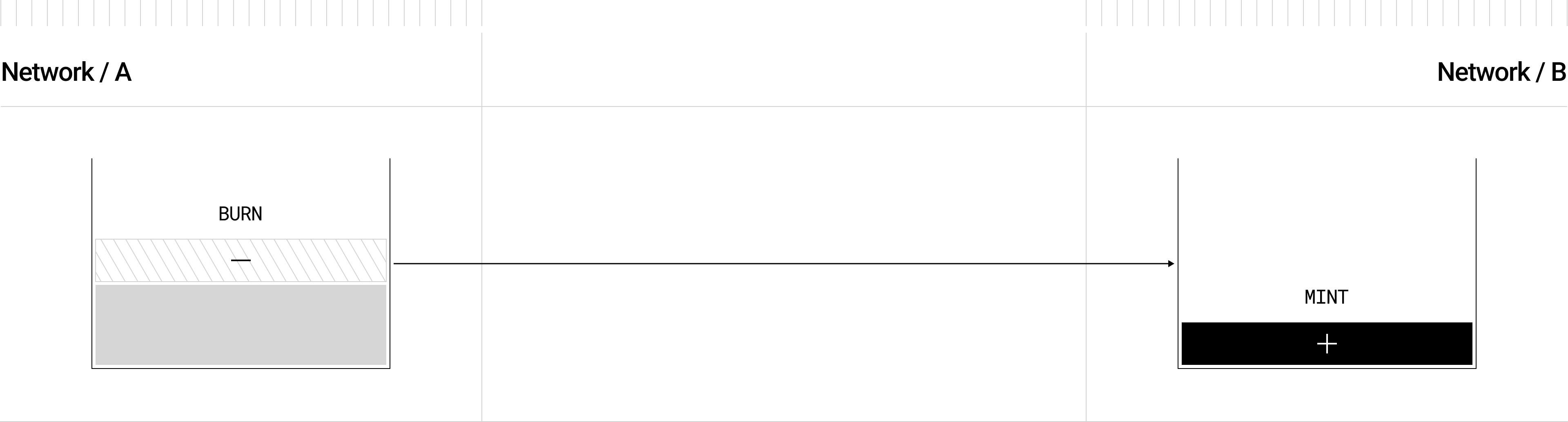
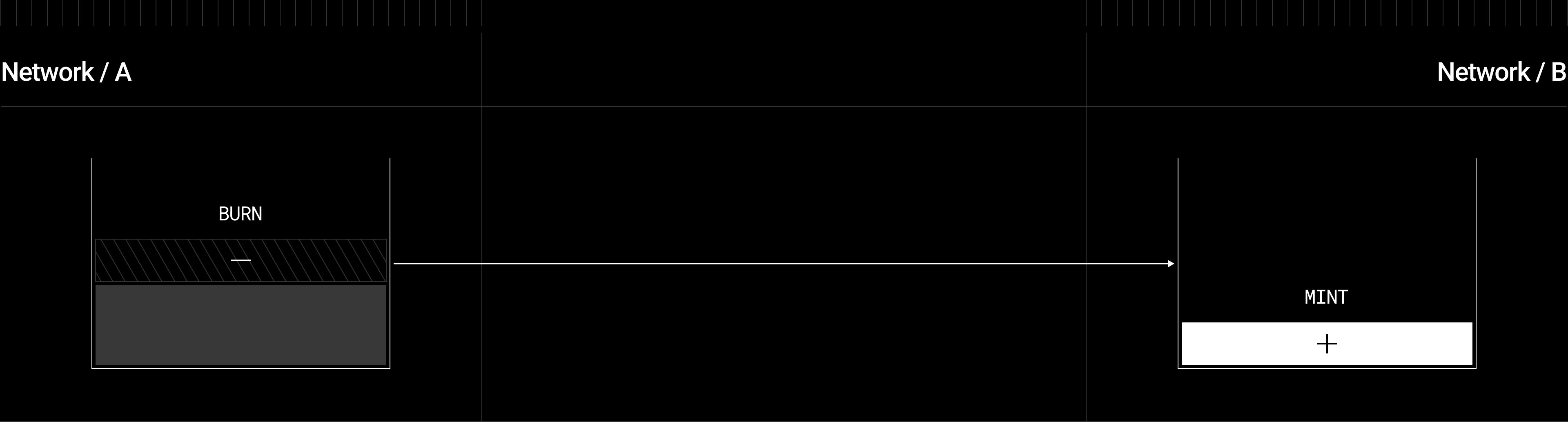
OFT.sol extends the base OApp.sol and inherits ERC20, providing both crosschain messaging and standard token functionality:


OFT Adapter
OFTAdapter.sol can be used for already deployed ERC20 tokens who lack mint capabilities, so that the _debit function calls safeERC20.transferFrom from a sender, while _credit calls safeERC20.transfer to a receiver.


OFTAdapter.sol provides token bridging without modifying the original ERC20 token contract:


For detailed technical information about transfer flows, decimal handling, and architecture patterns, see the OFT Technical Reference.
Find your chain
LayerZero supports OFT deployment on every EVM chain in the table below. Find your chain’s Endpoint ID (EID),EndpointId enum token, native chain ID, and a default RPC URL, then use those values wherever this guide references a chain (for example in your hardhat.config.ts networks block and your LayerZero config). The deployment flow is identical for every chain; only these identifiers change.
Installation
Below, you can find instructions for installing the OFT contract:OFT in a new project
To start using LayerZero OFT contracts in a new project, use the LayerZero CLI tool, create-lz-oapp. The CLI tool allows developers to create any omnichain application in <4 minutes! Get started by running the following from your command line:OFT in an existing project
To use LayerZero contracts in an existing project, you can install the OFT package directly:- npm
- yarn
- pnpm
- forge
LayerZero contracts work with both OpenZeppelin V5 and V4 contracts. Specify your desired version in your project’s
package.json:Custom OFT Contract
To build your own omnichain token contract, inherit fromOFT.sol or OFTAdapter.sol depending on whether you’re creating a new token or bridging an existing one.
Below is a complete example showing the key pieces you need to implement:
- OFT (New token)
- OFT Adapter (Existing token)
- Burning tokens on the source chain when sending
- Minting tokens on the destination chain when receiving
- Decimal precision conversion between different chains
- Unified supply management across all networks
Constructor
- Pass the Endpoint V2 address and owner address into the base contracts.
OFT(_name, _symbol, _lzEndpoint, _owner)binds your contract to the local LayerZero Endpoint V2 and registers the delegateOwnable(_owner)makes_ownerthe only address that can change configurations (such as peers, enforced options, and delegate)
- After deployment, the owner can call:
setConfig(...)to adjust library or DVN parameterssetSendLibrary(...)andsetReceiveLibrary(...)to override default librariessetPeer(...)to whitelist remote OFT addressessetDelegate(...)to assign a different delegate addresssetEnforcedOptions(...)to set mandatory execution options
Deployment and Wiring
After you finish writing and testing yourMyOFT contract, follow these steps to deploy it on each network and wire up the messaging stack.
1. Deploy Your OFT Contract
DeployMyOFT on each chain using either the LayerZero CLI (recommended) or manual deployment scripts.
- LayerZero CLI
- Manual Foundry
After running The LayerZero CLI provides automated deployment with built-in endpoint detection based on your The CLI will prompt you to:The CLI automatically:
pnpm compile at the root level of your example repo, you can deploy your contracts.Network Configuration
Before using the CLI, you’ll need to configure your networks inhardhat.config.ts with LayerZero Endpoint IDs (EIDs) and declare an RPC URL in your .env or directly in the config file:The key addition to a standard
hardhat.config.ts is the inclusion of LayerZero Endpoint IDs (eid) for each network. Check the Deployments section for all available endpoint IDs.hardhat.config.ts networks object:- Select chains to deploy to:
- Choose deploy script tags:
- Confirm deployment:
- Detects the correct LayerZero Endpoint V2 address for each chain
- Deploys your OApp contract with proper constructor arguments
- Generates deployment artifacts in
./deployments/folder - Creates network-specific deployment files (e.g.,
deployments/sepolia/MyOApp.json)
2. Wire Messaging Libraries and Configurations
Once your contracts are onchain, you must set up send/receive libraries and DVN/Executor settings so crosschain messages flow correctly.- LayerZero CLI
- Manual Foundry
The LayerZero CLI automatically handles all wiring via a single configuration file and command:Make sure your contract object’s This automatically handles:
Configuration File
In your project root, you can find alayerzero.config.ts file:contractName matches the named deployment file for the network under ./deployments/.Wire Everything
Run a single command to configure all pathways:- Fetching the necessary contract addresses for each network from metadata
- Setting send and receive libraries
- Configuring DVNs and Executors
- Setting up peers between contracts
- Applying enforced options
- All bidirectional pathways in your config
Usage
Once deployed and wired, you can begin sending tokens across chains.Send tokens
The OFT standard provides methods for quoting and sending tokens crosschain via the IOFT interface.quoteSend() - Get Transfer Fees
quoteOFT() - Get Detailed Transfer Quote
send() - Transfer Tokens
How send() Works Under the Hood
When you callsend(), it triggers a chain of calls through the LayerZero protocol:
- OFT Contract → Debits tokens
- LayerZero Endpoint → Routes the message to your configured MessageLib
- Message Library (SendUln302) → Requests verification/execution from configured DVNs/Executor
- Workers (DVNs + Executor) → Quote their fees for verification and execution services
- Fee Aggregation → Returns total
nativeFeeneeded for the transfer
- Send/Receive libraries - Set the MessageLibs for your contract
- DVNs - Select which DVNs verify your crosschain messages (at least one required)
- Enforced options OR caller options - Provide gas settings (globally or per call), or transactions fail with
LZ_ULN_InvalidWorkerOptions - Peers - Register destination OFT addresses for crosschain transfers
send() will work. They are configured during the “Deployment and Wiring” step above.
Trust Decisions
Using Managed Applications (e.g., Stargate): You trust the application team’s selected DVNs and Executor configurations.Deploying Your Own OFT: You select your trusted DVNs and Executors, giving you full control over your security assumptions.- LayerZero CLI
- Manual Foundry
The LayerZero CLI provides a convenient task for sending OFT tokens that automatically handles fee estimation and transaction execution.Required Parameters:The task automatically:
Using the Send Task
The CLI includes a built-inlz:oft:send task that:- Finds your deployed OFT contract automatically
- Quotes the gas cost using your OFT’s
quoteSend()function - Sends the tokens with the correct fee
- Provides tracking links for the transaction
--src-eid: Source endpoint ID (e.g., 40232 for Optimism Sepolia)--dst-eid: Destination endpoint ID (e.g., 40231 for Arbitrum Sepolia)--amount: Amount to send in human readable units (e.g., “1.5”)--to: Recipient address (20-byte hex for EVM)
--min-amount: Minimum amount to receive for slippage protection (e.g., “1.4”)--extra-options: Additional gas units for lzReceive, lzCompose, or receiver address--compose-msg: Arbitrary bytes message to deliver alongside the OFT--oft-address: Override the source OFT address (if not using deployment artifacts)
- Finds your deployed OFT contract from deployment artifacts
- Handles token approvals (for OFTAdapter)
- Quotes the exact gas fee needed
- Provides block explorer and LayerZero Scan links for tracking
Send tokens + call composer
Horizontal composability allows your OFT to trigger additional actions on the destination chain through separate, containerized message packets. Unlike vertical composability (multiple calls in a single transaction), horizontal composability processes operations independently, providing better fault isolation and gas efficiency.

Benefits of Horizontal Composability
- Fault Isolation: If a composed call fails, it doesn’t revert the main token transfer
- Gas Efficiency: Each step can have independent gas limits and execution options
- Flexible Workflows: Complex multi-step operations can be broken into manageable pieces
- Non-Critical Operations: Secondary actions (like swaps or staking) can fail without affecting token delivery
Workflow Overview
- Token Transfer: OFT processes the token transfer in
_lzReceive()and credits tokens to the recipient - Compose Message: OFT calls
endpoint.sendCompose()to queue a separate composed message - Composer Execution: The composer contract receives the message via
lzCompose()and executes custom logic
Sending with ComposeMsg
When sending tokens with composed actions, set theto address to your composer contract and include your custom composeMsg:
Understanding the Message Encoding
When using composed messages, the OFT encodes yourcomposeMsg along with token transfer data. After processing the transfer, the destination OFT re-encodes this data and delivers it to your composer contract via endpoint.sendCompose().
For the complete message structures and codec functions, see the Message Encoding Reference documentation.
Execution Options for Composed Messages
Composed messages require gas for two separate executions:- Token Transfer (
lzReceive): Credits tokens and queues the composed message - Composer Call (
lzCompose): Executes your custom logic in the composer contract
Using the CLI with Composed Messages
Thelz:oft:send task supports composed messages via the --compose-msg and --extra-options parameters:
Implementing a Composer Contract
The composer contract must implementIOAppComposer to handle composed messages. Here’s a comprehensive example:
Key Security Considerations
- Endpoint Verification: Always verify
msg.sender == endpoint - OApp Authentication: Only accept messages from trusted OApps
- Message Validation: Validate all decoded parameters before execution
- Reentrancy Protection: Consider using
ReentrancyGuardfor complex operations
Extensions
The OFT Standard can be extended to support several different use cases, similar to the ERC20 token standard. Since OFT inherits from the base OApp contract, all OApp extensions and patterns are also available to OFT implementations, providing maximum flexibility for crosschain token applications. Below you can find relevant patterns and extensions:Rate Limiting
TheRateLimiter pattern controls the number of tokens that can be transferred crosschain within a specific time window. This is particularly valuable for OFTs to prevent abuse and ensure controlled token flow across chains.
Why Use Rate Limiting for OFTs?
- Prevent Token Drain Attacks: Protects against malicious actors attempting to rapidly drain tokens from a chain
- Regulatory Compliance: Helps meet compliance requirements for controlled cross-blockchain token transfers
- Supply Management: Maintains balanced token distribution across chains by limiting transfer velocity
- Risk Management: Reduces exposure to smart contract vulnerabilities or bridge exploits
Implementation
Inherit from bothOFT and RateLimiter in your contract:
Configuration
Set up rate limits per destination chain during deployment:Dynamic Rate Limit Management
Add functions to update rate limits post-deployment:Rate Limit Behavior
When a transfer exceeds the rate limit:- The transaction reverts with a rate limit error
- Users must wait for the time window to reset
- The limit resets based on a sliding window mechanism
Mint & Burn OFT Adapter
TheMintBurnOFTAdapter is a specialized adapter for existing ERC20 tokens that have exposed mint and burn functions. Unlike the standard OFTAdapter which locks/unlocks tokens, this adapter burns tokens on the source chain and mints them on the destination chain.
Key Differences from Standard OFTAdapter
When to Use MintBurnOFTAdapter
- Tokens with mint/burn capabilities: Your ERC20 already has
mint()andburn()functions - Dynamic supply management: You prefer burning/minting over locking mechanisms
- Reduced custody risk: Eliminate the risk of locked token supply running dry when using multiple adapters
Installation
To get started with a MintBurnOFTAdapter example, use the LayerZero CLI tool to create a new project:- Example
MintBurnOFTAdaptercontracts - Sample
ElevatedMinterBurnerimplementation - Deployment and configuration scripts
- Crosschain unit tests
Implementation
Create your mint/burn adapter by inheriting fromMintBurnOFTAdapter:
Token Requirements
You need a contract that implements theIMintableBurnable interface. This can be either:
Option 1: Token directly implements the interface
IMintableBurnable, use an intermediary contract:
- Use existing tokens without modification
- Control which contracts can mint/burn through operator management
- Maintain existing token governance while adding bridge functionality
Usage Flow
-
Sending tokens:
- User calls
send()on the MintBurnOFTAdapter - Adapter burns tokens from user’s balance
- LayerZero message sent to destination
- User calls
-
Receiving tokens:
- Destination adapter receives LayerZero message
- Adapter mints new tokens to recipient’s address
Security Considerations
TheMintBurnOFTAdapter requires careful access control since it can mint tokens:
Unlike standard OFTAdapter, you can deploy multiple MintBurnOFTAdapters for the same omnichain mesh.
OFT Alt
When the native gas token cannot be used to pay LayerZero fees, you can useOFTAlt which supports payment in an alternative ERC20 token.
Installation
To get started with an OFTAlt example, use the LayerZero CLI tool to create a new project:- Example
OFTAltcontracts with alternative fee payment EndpointV2Altintegration setup- Alternative fee token configuration
- Deployment and configuration scripts
- Crosschain unit tests with ERC20 fee payments
Implementation
Key Differences
- Fee Payment: Uses ERC20 tokens instead of native gas
- Approval Required: You must approve the OFT contract to spend your fee tokens
- Endpoint: Must use
EndpointV2Altinstead of standardEndpointV2
Using OFT Alt
Before sending messages, approve the fee token:OFT Alt is designed for chains where native gas tokens are not suitable for LayerZero fees, such as certain L2s or sidechains with alternative fee mechanisms.
Further Reading
For more advanced patterns and detailed implementations, see:- OApp Design Patterns - Additional messaging patterns
- Message Execution Options - Detailed options configuration
- OFT Technical Reference - Deep dive into OFT mechanics