> ## Documentation Index
> Fetch the complete documentation index at: https://docs.layerzero.network/llms.txt
> Use this file to discover all available pages before exploring further.
# Message Execution Options
> Configure Message Execution Options for your LayerZero application. Set up DVNs, executors, and pathway settings for crosschain messaging. LayerZero...
export const Button = ({variant = 'primary', href, target, children}) => {
const baseClass = "custom-button";
const variantClass = variant === 'secondary' ? 'custom-button-secondary' : 'custom-button-primary';
const combinedClass = `${baseClass} ${variantClass}`;
if (href) {
return
{children}
;
}
return ;
};
What are message `_options`?
Because the source chain has no concept of the destination chain's state, you must specify the amount of gas you anticipate will be necessary for executing your `lzReceive` or `lzCompose` method on the destination smart contract.
LayerZero provides robust **Message Execution Options**, which allow you to specify arbitrary logic as part of the message transaction, such as the gas amount and `msg.value` the [Executor](../../../concepts/permissionless-execution/executors) pays for message delivery, the order of message execution, or dropping an amount of gas to a destination address.
The most common options you will use when building are [`lzReceiveOption`](#lzreceive-option), [`lzComposeOption`](#lzcompose-option), and [`lzNativeDropOption`](#lznativedrop-option).
It's important to remember that gas values may vary depending on the destination chain. For example, all new Ethereum transactions cost `21000` wei, but other chains may have lower or higher opcode costs, or entirely different gas mechanisms.
## Options Builders
A Solidity library and off-chain SDK have been provided to build specific Message Options for your application.
* `OptionsBuilder.sol`: Can be imported from [`@layerzerolabs/oapp-evm`](https://www.npmjs.com/package/@layerzerolabs/oapp-evm).
* `options.ts`: Can be imported from [`@layerzerolabs/lz-v2-utilities`](https://www.npmjs.com/package/@layerzerolabs/lz-v2-utilities).
## Generating Options
You can generate options depending on your OApp's development environment:
* **Remix**: for quick testing in Remix, you can deploy locally to the Remix VM a contract using the `OptionsBuilder.sol` library. See the example provided below.
* **Foundry**: `_options` can be generated directly in your Foundry unit tests using the `OptionsBuilder.sol` library. See the [OmniCounter Test](https://github.com/LayerZero-Labs/LayerZero-v2/blob/main/packages/layerzero-v2/evm/oapp/test/OmniCounter.t.sol#L80) file as an example for how to properly invoke options.
* **Hardhat**: you can also locally declare options in Hardhat via the `options.ts` file.
All tools use the same method for packing the `_options` bytes array to simplify your experience when switching between environments.
### Import Options
All `_options` tools must be imported into your environment to be used.
#### Options Library
Import the `OptionsBuilder` from `@layerzerolabs/oapp-evm` into either your Foundry test or smart contract to be deployed locally.
```solidity wrap theme={null}
import { OptionsBuilder } from "@layerzerolabs/oapp-evm/contracts/oapp/libs/OptionsBuilder.sol";
```
#### Options SDK
Start by importing `Options` from `@layerzerolabs/lz-v2-utilities`.
```javascript wrap theme={null}
import {Options} from '@layerzerolabs/lz-v2-utilities';
```
### Initialize Options
The `newOptions` method is used to initialize a new bytes array.
```javascript wrap theme={null}
const _options = Options.newOptions();
```
It's a starting point to which you can add specific option configurations.
The command below in Solidity allows you to conveniently extend the bytes type with LayerZero's `OptionsBuilder` library methods, simplifying the creation and manipulation of message execution options.
```solidity wrap theme={null}
using OptionsBuilder for bytes;
```
### Add Options Types
When generating `_options`, you will want to allocate specific gas amounts for handling different message types used in your smart contract. For instance, `addExecutorLzReceiveOption` is a method that can be used to specify how much gas limit and `msg.value` the Executor uses when calling `lzReceive` on the receiving chain.
```javascript wrap theme={null}
const GAS_LIMIT = 1000000; // Gas limit for the executor
const MSG_VALUE = 0; // msg.value for the lzReceive() function on destination in wei
const _options = Options.newOptions().addExecutorLzReceiveOption(GAS_LIMIT, MSG_VALUE);
```
You can continue appending new `Options` methods to add more Executor message handling; all packed into a single call.
See below for all [Option Types](#option-types).
For each chain pathway, your OApp's configured Executor has a **native cap**: an upper bound for how much gas can be sent to the destination chain.
In general, the sum of your message execution options must be **LESS THAN** the native cap.
To check the native gas cap, you can query the Executor contract's `DstConfig` using the [**Executor address**](../../../deployments/deployed-contracts) and the [**`IExecutor.sol` interface**](https://github.com/LayerZero-Labs/LayerZero-v2/blob/bf4318b5e88e46400931bb4c1f6aa0343c035a79/messagelib/contracts/interfaces/IExecutor.sol):
```solidity wrap theme={null}
function dstConfig(uint32 _dstEid) external view returns (uint64, uint16, uint128, uint128);
struct DstConfig {
uint64 baseGas; // for verifying / fixed calldata overhead
uint16 multiplierBps;
uint128 floorMarginUSD; // uses priceFeed PRICE_RATIO_DENOMINATOR
uint128 nativeCap; // the MAX amount of native gas an OApp can use in execution options
}
```
The [**create-lz-oapp**](../../../get-started/create-lz-oapp/adding-networks) npx package includes a script by default for checking all the Executor `DstConfigs` for your project:
```bash wrap theme={null}
npx hardhat lz:oapp:config:get:executor
```
### Pass Options in Send Call
After generating `_options`, you will want to test them in a `send` call.
#### Options SDK
Using the Options SDK, this can be passed directly into a Hardhat task or unit test depending on your use case.
```javascript wrap theme={null}
// Other parameters for the send function
const _dstEid = 'someEndpointId'; // Destination endpoint ID
const message = 'Your message here'; // The message you want to send
// Call the send function on the smart contract
// Convert your options array toHex()
const tx = await yourOAppContract.send(destEndpointId, message, _options.toHex());
await tx.wait();
```
In this Typescript snippet, the `send` function is being called on the `YourOAppContract` contract instance, passing in the destination endpoint ID, the message, and the `_options` that were constructed:
```solidity wrap theme={null}
contract YourOAppContract {
// ... other functions and declarations
function send(uint32 _dstEid, string memory message, bytes memory _options) public payable {
// Logic to handle the sending of the message with the provided options
// This might involve interacting with other contracts or internal logic
bytes memory _payload = abi.encode(message);
_lzSend(
_dstEid, // Destination chain's endpoint ID.
_payload, // Encoded message payload being sent.
_options, // Message execution options (e.g., gas to use on destination).
MessagingFee(msg.value, 0), // Fee struct containing native gas and ZRO token.
payable(msg.sender) // The refund address in case the send call reverts.
);
}
// ... other functions and declarations
}
```
In this Solidity snippet, the `send` function takes three parameters: `_dstEid`, `message`, and `_options`. The function's logic would then use those parameters to to send a message crosschain.
#### Options Library
Using the `OptionsBuilder.sol` library, these `_options` can be directly referenced in your Foundry tests for quick local testing.
```solidity wrap theme={null}
import { MyOApp } from "../contracts/oapp/examples/MyOApp.sol";
import { TestHelper } from "../contracts/tests/TestHelper.sol";
import { OptionsBuilder } from "@layerzerolabs/oapp-evm/contracts/oapp/libs/OptionsBuilder.sol";
contract MyOAppTest is TestHelper {
using OptionsBuilder for bytes;
// ... other test setup functions
function test_increment() public {
bytes memory options = OptionsBuilder.newOptions().addExecutorLzReceiveOption(50000, 0);
(uint256 nativeFee, ) = aCounter.quote(bEid, MsgCodec.VANILLA_TYPE, options);
aCounter.increment{ value: nativeFee }(bEid, MsgCodec.VANILLA_TYPE, options);
// ... other test logic
}
}
```
The above example is taken from the [OmniCounter Foundry Test](https://github.com/LayerZero-Labs/LayerZero-v2/blob/main/packages/layerzero-v2/evm/oapp/test/OmniCounter.t.sol#L76) in the LayerZero V2 repo.
See [**`TestHelper.sol`**](https://github.com/LayerZero-Labs/LayerZero-v2/blob/432db51666878f147ceaf1c46d230f344430c78e/oapp/test/TestHelper.sol#L4) for full Foundry testing support.
## Option Types
There are multiple option types to take advantage of, each controlling specific handling of LayerZero messages.
### `lzReceive` Option
The `lzReceive` option specifies the gas values the Executor uses when calling `lzReceive` on the destination chain.
```javascript wrap theme={null}
Options.newOptions().addExecutorLzReceiveOption(50000, 0);
```
It defines the amount of `_gas` and `msg.value` to be used in the `lzReceive` call by the Executor on the destination chain:
`OPTION_TYPE_LZRECEIVE` contains `(uint128 _gas, uint128 _value)`
`_gas`: The amount of gas you'd provide for the `lzReceive` call in source chain native tokens. `50000` should be enough for most transactions, but this value should be profiled based on your function's specific opcode cost on each chain.
`_value`: The `msg.value` for the call. This value is often included to fund any operations that need native gas on the destination chain, including sending another nested message.
### `lzCompose` Option
This option allows you to allocate some gas and value to your **Composed Message** on the destination chain. [`lzCompose`](../../../concepts/message-ordering) is used when you want to call external contracts from your `lzReceive` function.
```javascript wrap theme={null}
Options.newOptions().addExecutorLzComposeOption(0, 30000, 0);
```
`OPTION_TYPE_LZCOMPOSE` contains `(uint16 _index, uint128 _gas, uint128 _value)`
`_index`: The index of the `lzCompose()` function call. When multiples of this option are added, they are summed PER index by the Executor on the remote chain. This can be useful for defining multiple composed message steps that happen sequentially.
`_gas`: The gas amount for the lzCompose call varies based on the destination's compose logic and the destination chain's characteristics (e.g., opcode pricing). It's important to perform tailored testing to determine the optimal gas requirement for your specific transaction needs.
`_value`: The `msg.value` for the call.
### `lzNativeDrop` Option
This option contains how much native gas you want to drop to the `_receiver`, this is often done to allow users or a contract to have some gas on a new chain.
```javascript wrap theme={null}
Options.newOptions().addExecutorNativeDropOption(100000, receiverAddressInBytes32);
```
`OPTION_TYPE_LZNATIVEDROP` contains `(uint128 _amount, bytes32 _receiver)`
`_amount`: The amount of gas in wei to drop for the receiver.
`_receiver`: The `bytes32` representation of the receiver address.
### `OrderedExecution` Option
By adding this option, the Executor will utilize [**Ordered Message Delivery**](../../../concepts/message-ordering#unordered-delivery). This overrides the default behavior of [**Unordered Message Delivery**](../../../concepts/message-ordering#unordered-delivery).
```javascript wrap theme={null}
Options.newOptions().addExecutorOrderedExecutionOption(bytes(''));
```
For example, if nonce `2` transaction fails, all subsequent transactions with this option will not be executed until the previous message has been resolved with.
`bytes`: The argument should always be initialized as an empty bytes array (`""`).
These message `_options` must be combined with in-app contract changes, listed under [**Ordered Message Delivery**](../../../concepts/message-ordering#enabling-ordered-delivery).
### Duplicate Option Types
Multiple options of the same type can be passed and appended into the same options array. The logic on how multiple options of the same type are summed differs per option type:
```solidity wrap theme={null}
bytes memory options = OptionsBuilder.newOptions().addExecutorLzReceiveOption(50000, 0).addExecutorLzComposeOption(0, 30000, 0).addExecutorLzComposeOption(1, 30000, 0);
```
* **`lzReceive`**: Both the `_gas` and `_value` parameters are summed.
* **`lzCompose`**: Both the `_gas` and `_value` parameters are **summed by index**.
* **`lzNativeDrop`**: The `_amount` parameter is summed by unique `_receiver` address.
Make sure that appending multiple options is the intended behavior of your unique OApp.
## Determining Gas Costs
Gas profiling and optimization is outside the scope of LayerZero's documentation, however, the following resources may be useful for determining what `_options` should be used for your `_lzReceive` and `lzCompose` calls.
### Tenderly
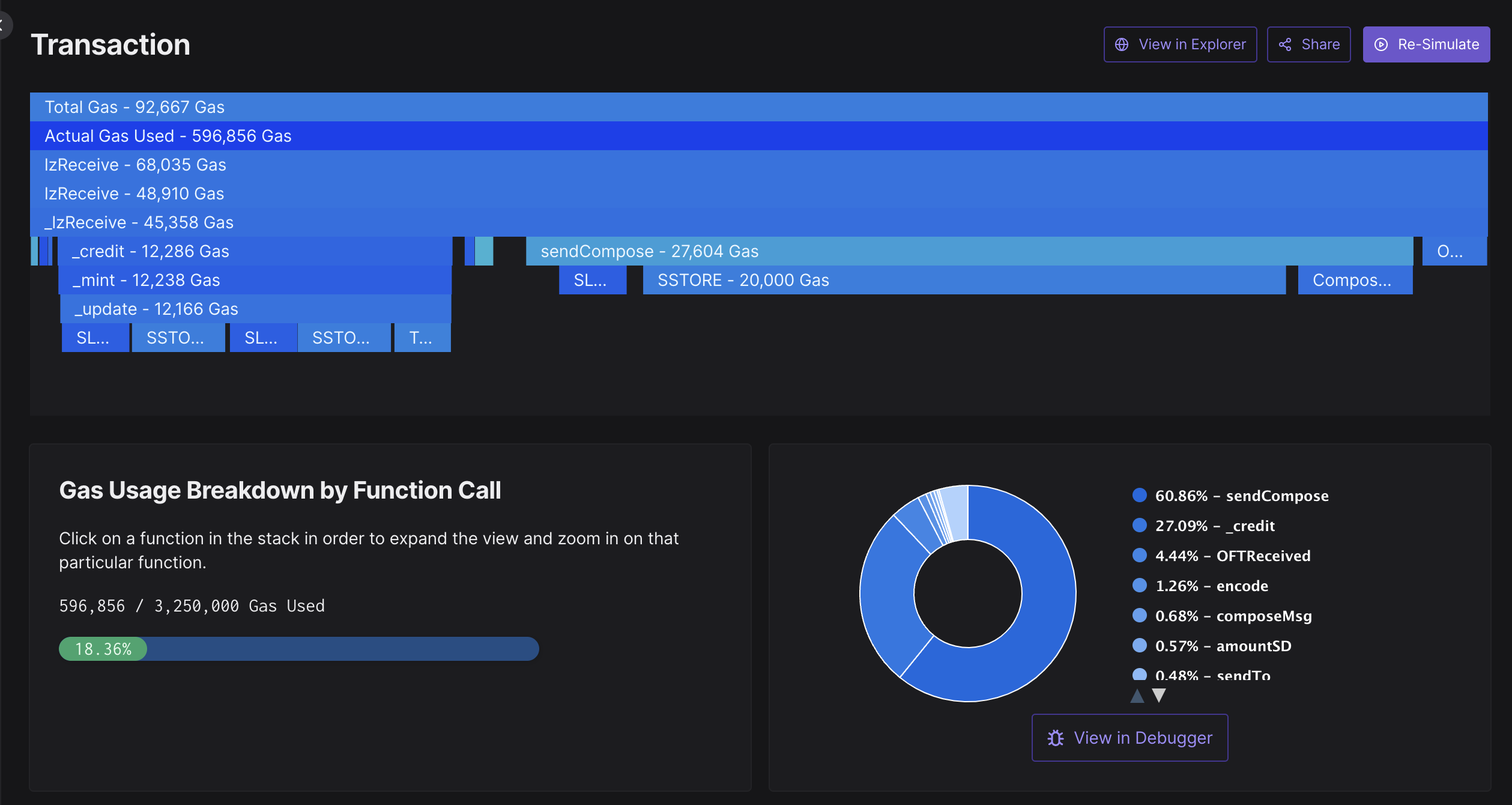
For supported chains, the [Tenderly Gas Profiler](https://dashboard.tenderly.co/explorer) can be extremely useful for determining how much to reduce your execution options by:
In the above image, you can see that the \_lzReceive call for this OFT token transfer with composed call used `45,358` wei for gas.
* Provided `lzReceive` Option: `50000` wei
* Actual `lzReceive` Cost: `45,358` wei
In general, this opcode cost may fluctuate depending on the destination chain and how your contract logic executes, so you should take care in defining `_options` based on the message types for your application.
 In the above image, you can see that the \_lzReceive call for this OFT token transfer with composed call used `45,358` wei for gas.
* Provided `lzReceive` Option: `50000` wei
* Actual `lzReceive` Cost: `45,358` wei
In general, this opcode cost may fluctuate depending on the destination chain and how your contract logic executes, so you should take care in defining `_options` based on the message types for your application.
In the above image, you can see that the \_lzReceive call for this OFT token transfer with composed call used `45,358` wei for gas.
* Provided `lzReceive` Option: `50000` wei
* Actual `lzReceive` Cost: `45,358` wei
In general, this opcode cost may fluctuate depending on the destination chain and how your contract logic executes, so you should take care in defining `_options` based on the message types for your application.