> ## Documentation Index
> Fetch the complete documentation index at: https://docs.layerzero.network/llms.txt
> Use this file to discover all available pages before exploring further.
# Issue Crosschain Assets
> Create and deploy Omnichain Fungible Tokens (OFTs) that work natively across 150+ blockchains without bridges or wrapped assets.
Deploy your own **Omnichain Fungible Token (OFT)** that works natively across 150+ blockchains. No bridges, no wrapped tokens.
Understand the architecture.
See existing OFT deployments.
***
## Should You Issue an OFT?
Before deploying your own OFT, consider whether you actually need to:
| Scenario | Recommendation |
| ------------------------------------------------------------ | ---------------------------------------------------------------------------------------- |
| You need to transfer USDC or ETH | Use [Stargate](/v2/concepts/applications/stargate-finance) - assets already exist |
| You want to integrate existing OFTs (USDT0, USDe, WBTC) | Just integrate them - see [OFT Ecosystem](/v2/deployments/oft-ecosystem-stargate-assets) |
| You're issuing a **new token** that needs to be crosschain | **Yes, deploy an OFT** |
| You have an **existing token** that needs crosschain support | **Yes, use OFT LockUnlock** (or BurnMint if token has mint/burn) |
**Check if the asset is already an OFT.** If so (Stargate assets, USDT0, USDe), you can integrate directly without deploying your own.
***
## How OFTs Work
When tokens move between chains, they are **removed from circulation on the source chain** and **added to circulation on the destination chain**. This keeps the global token supply constant regardless of which chains hold balances.
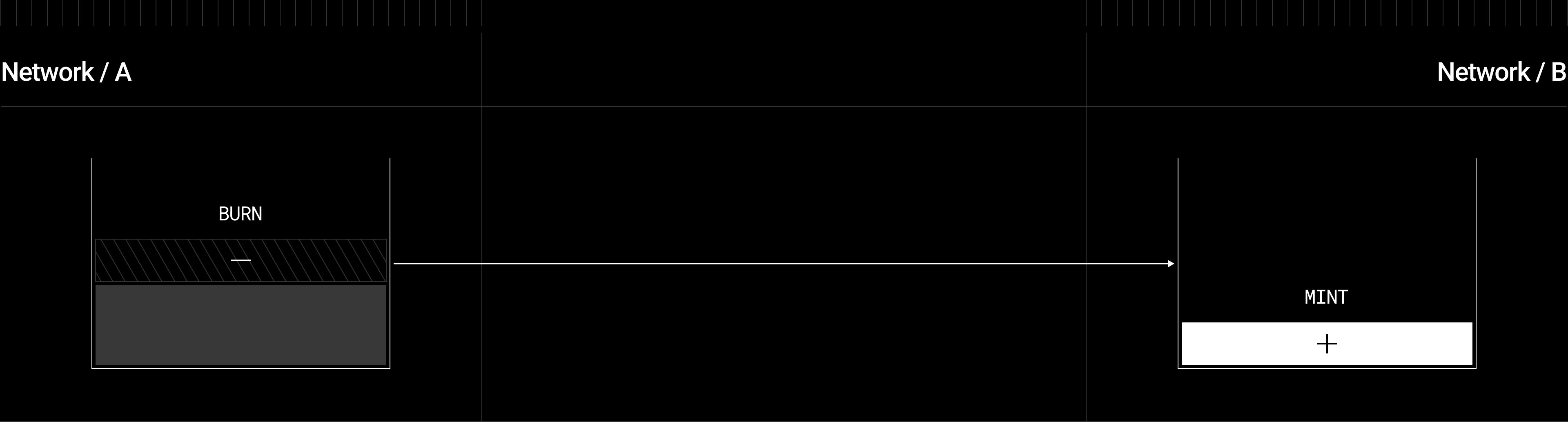
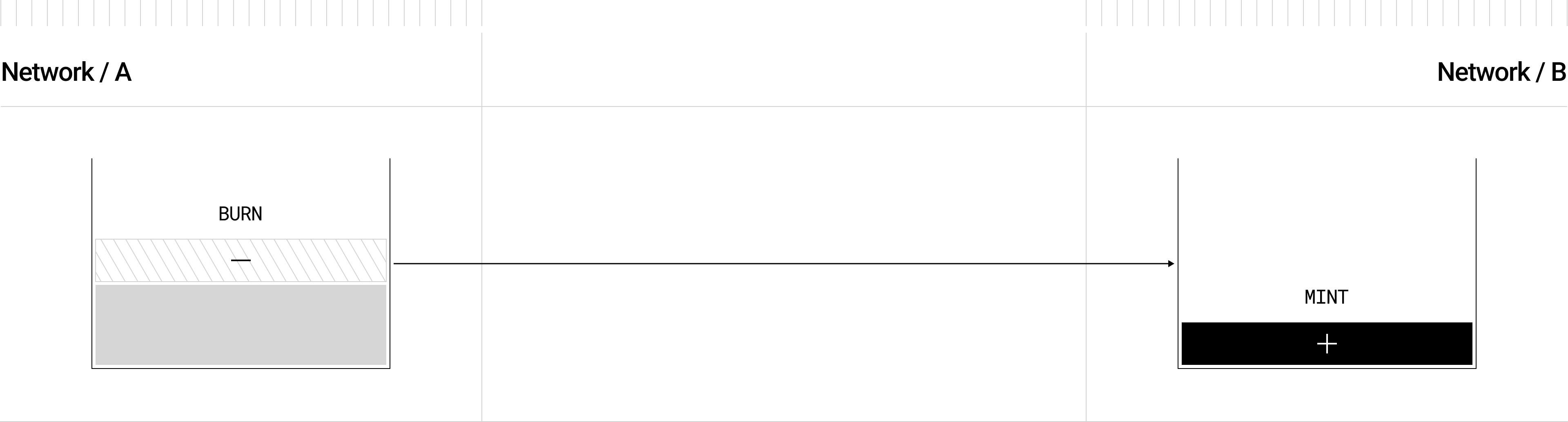 1. **Source chain:** Tokens are removed from circulation
2. **LayerZero message:** Transfer details are sent crosschain via DVNs
3. **Destination chain:** Equivalent tokens are added to circulation for the recipient
This maintains a **unified supply** across all chains.
***
## Transfer Mechanisms: BurnMint vs LockUnlock
There are two ways to remove tokens from circulation and add them back:
| Mechanism | Remove from Circulation | Add to Circulation | Constraint |
| -------------- | --------------------------------- | ----------------------------------- | ------------------------------------- |
| **BurnMint** | Tokens are **burned** (destroyed) | Tokens are **minted** (created) | None - deploy on any number of chains |
| **LockUnlock** | Tokens are **locked** in escrow | Tokens are **released** from escrow | **Only ONE lockbox per mesh** |
### Why BurnMint is Preferred
With BurnMint, tokens are destroyed on the source chain and created on the destination:
* **No stored value risk**: No pool of tokens in escrow that could be targeted
* **Unlimited scalability**: Deploy to any number of chains without constraints
* **Simple supply accounting**: Total supply = sum of all chain balances
### When LockUnlock is Required
LockUnlock is necessary when you have an **existing token without mint/burn capabilities**. Instead of destroying tokens, they're held in an escrow (the "lockbox"). On the destination, OFT tokens are minted that represent claims on the locked tokens.
1. **Source chain:** Tokens are removed from circulation
2. **LayerZero message:** Transfer details are sent crosschain via DVNs
3. **Destination chain:** Equivalent tokens are added to circulation for the recipient
This maintains a **unified supply** across all chains.
***
## Transfer Mechanisms: BurnMint vs LockUnlock
There are two ways to remove tokens from circulation and add them back:
| Mechanism | Remove from Circulation | Add to Circulation | Constraint |
| -------------- | --------------------------------- | ----------------------------------- | ------------------------------------- |
| **BurnMint** | Tokens are **burned** (destroyed) | Tokens are **minted** (created) | None - deploy on any number of chains |
| **LockUnlock** | Tokens are **locked** in escrow | Tokens are **released** from escrow | **Only ONE lockbox per mesh** |
### Why BurnMint is Preferred
With BurnMint, tokens are destroyed on the source chain and created on the destination:
* **No stored value risk**: No pool of tokens in escrow that could be targeted
* **Unlimited scalability**: Deploy to any number of chains without constraints
* **Simple supply accounting**: Total supply = sum of all chain balances
### When LockUnlock is Required
LockUnlock is necessary when you have an **existing token without mint/burn capabilities**. Instead of destroying tokens, they're held in an escrow (the "lockbox"). On the destination, OFT tokens are minted that represent claims on the locked tokens.

 ### The Single Lockbox Rule
**You can only have ONE LockUnlock deployment in your entire omnichain mesh.** All other chains must use BurnMint.
**Why?** The lockbox must contain enough tokens to satisfy all possible redemptions. Consider what happens with multiple lockboxes:
1. Lockbox A on Ethereum holds 1M tokens
2. Lockbox B on Arbitrum holds 500K tokens
3. Users on other chains hold 1.5M OFT tokens total
If all OFT holders try to redeem to Ethereum, Lockbox A only has 1M tokens - 500K redemptions would fail. This creates a **"run on the bank"** scenario where:
* Messages are successfully sent requesting redemption
* The lockbox doesn't have sufficient supply to fulfill them
* Transactions revert, leaving users with tokens they can't redeem
With a **single lockbox**, the entire circulating supply on external chains is always backed 1:1 by the lockbox. BurnMint deployments on other chains don't need backing because they destroy/create tokens rather than holding reserves.
**Advanced: Multiple lockboxes are possible with additional mechanisms.** Stargate Pools use a credit-based rebalancing mechanism that limits maximum transfers per pathway, preventing runs on any single pool. However, this adds significant complexity to your deployment and requires careful liquidity management. For most use cases, a single lockbox with BurnMint on other chains is the recommended approach.
**Prefer BurnMint when possible.** If your existing token has mint/burn capabilities (or you can add them), use BurnMint to avoid the single lockbox constraint.
***
## Deployment Process
Select your blockchain platform from the guides below.
Deploy your OFT (or OFTAdapter) on each chain you want to support.
Connect your deployments using LayerZero DevTools so they recognize each other as peers.
Set up [DVNs and Executors](/v2/developers/evm/configuration/dvn-executor-config) for your pathways.
Send test transfers between chains to verify everything works.
***
## Platform Guides
Ethereum, Arbitrum, Base, and 100+ EVM chains.
SPL tokens with the Anchor framework.
Move language on Sui.
Move language on IOTA L1.
Move language on Aptos.
Dual HyperEVM/HyperCore architecture.
***
## Advanced Topics
Send native gas tokens crosschain.
Omnichain Non-Fungible Tokens for crosschain NFT transfers.
Bundle token transfers with swaps, deposits, or other actions.
Manage OFT liquidity across chains with OVault.
***
## Common Questions
LayerZero supports 150+ chains. You can deploy your OFT to any combination of supported chains. Start with a few and expand as needed.
Yes. Deploy your OFT to the new chain, run `lz:oapp:wire` to connect it, and your existing deployments don't need any changes.
Deployment costs vary by chain (gas fees). Crosschain transfers cost LayerZero messaging fees (DVN + Executor fees), typically $0.01-$1 depending on the pathway.
OFT uses "shared decimals" (default: 6) for crosschain transfers. The contracts handle conversion automatically. See the [OFT Technical Reference](/v2/concepts/technical-reference/oft-reference) for details.
Yes. OFTs implement the standard OFT interface, which is compatible with Stargate's bridge UI at [stargate.finance](https://stargate.finance).
### The Single Lockbox Rule
**You can only have ONE LockUnlock deployment in your entire omnichain mesh.** All other chains must use BurnMint.
**Why?** The lockbox must contain enough tokens to satisfy all possible redemptions. Consider what happens with multiple lockboxes:
1. Lockbox A on Ethereum holds 1M tokens
2. Lockbox B on Arbitrum holds 500K tokens
3. Users on other chains hold 1.5M OFT tokens total
If all OFT holders try to redeem to Ethereum, Lockbox A only has 1M tokens - 500K redemptions would fail. This creates a **"run on the bank"** scenario where:
* Messages are successfully sent requesting redemption
* The lockbox doesn't have sufficient supply to fulfill them
* Transactions revert, leaving users with tokens they can't redeem
With a **single lockbox**, the entire circulating supply on external chains is always backed 1:1 by the lockbox. BurnMint deployments on other chains don't need backing because they destroy/create tokens rather than holding reserves.
**Advanced: Multiple lockboxes are possible with additional mechanisms.** Stargate Pools use a credit-based rebalancing mechanism that limits maximum transfers per pathway, preventing runs on any single pool. However, this adds significant complexity to your deployment and requires careful liquidity management. For most use cases, a single lockbox with BurnMint on other chains is the recommended approach.
**Prefer BurnMint when possible.** If your existing token has mint/burn capabilities (or you can add them), use BurnMint to avoid the single lockbox constraint.
***
## Deployment Process
Select your blockchain platform from the guides below.
Deploy your OFT (or OFTAdapter) on each chain you want to support.
Connect your deployments using LayerZero DevTools so they recognize each other as peers.
Set up [DVNs and Executors](/v2/developers/evm/configuration/dvn-executor-config) for your pathways.
Send test transfers between chains to verify everything works.
***
## Platform Guides
Ethereum, Arbitrum, Base, and 100+ EVM chains.
SPL tokens with the Anchor framework.
Move language on Sui.
Move language on IOTA L1.
Move language on Aptos.
Dual HyperEVM/HyperCore architecture.
***
## Advanced Topics
Send native gas tokens crosschain.
Omnichain Non-Fungible Tokens for crosschain NFT transfers.
Bundle token transfers with swaps, deposits, or other actions.
Manage OFT liquidity across chains with OVault.
***
## Common Questions
LayerZero supports 150+ chains. You can deploy your OFT to any combination of supported chains. Start with a few and expand as needed.
Yes. Deploy your OFT to the new chain, run `lz:oapp:wire` to connect it, and your existing deployments don't need any changes.
Deployment costs vary by chain (gas fees). Crosschain transfers cost LayerZero messaging fees (DVN + Executor fees), typically $0.01-$1 depending on the pathway.
OFT uses "shared decimals" (default: 6) for crosschain transfers. The contracts handle conversion automatically. See the [OFT Technical Reference](/v2/concepts/technical-reference/oft-reference) for details.
Yes. OFTs implement the standard OFT interface, which is compatible with Stargate's bridge UI at [stargate.finance](https://stargate.finance).